Netolyst product

Distribution software, built for Pakistan.

Stop juggling registers, Excel sheets and separate accounting software. Netolyst DMS handles order booking, batch-wise stock, invoicing, party khata and full accounts in a single system made for Pakistani distributors.

+92 336 0861999

ONE SYSTEM, THE WHOLE DAY
NETOLYSTDMSThe bookerno signal neededThe invoicebatch, rate, expiryThe khataowed and paidThe booksclosed as you goBUILT, DEPLOYED, RUNNING
Everything the day produces.
One system behind all of it.

A distributor management system — built, deployed, and running real businesses.

The software is built, tested, deployed, and in use by real distribution businesses. The web app runs at dms.netolyst.com, the Android app lets sales teams take orders in the field, and the system handles the day-to-day work of running a distribution operation — from sales and stock to payments and accounts.

What comes next is scaling what is already working: bringing more distribution houses onto Netolyst, expanding the product based on real-world usage, and turning early customers into long-term partners.

The dashboard

Sales, stock and profit, all on one live dashboard.

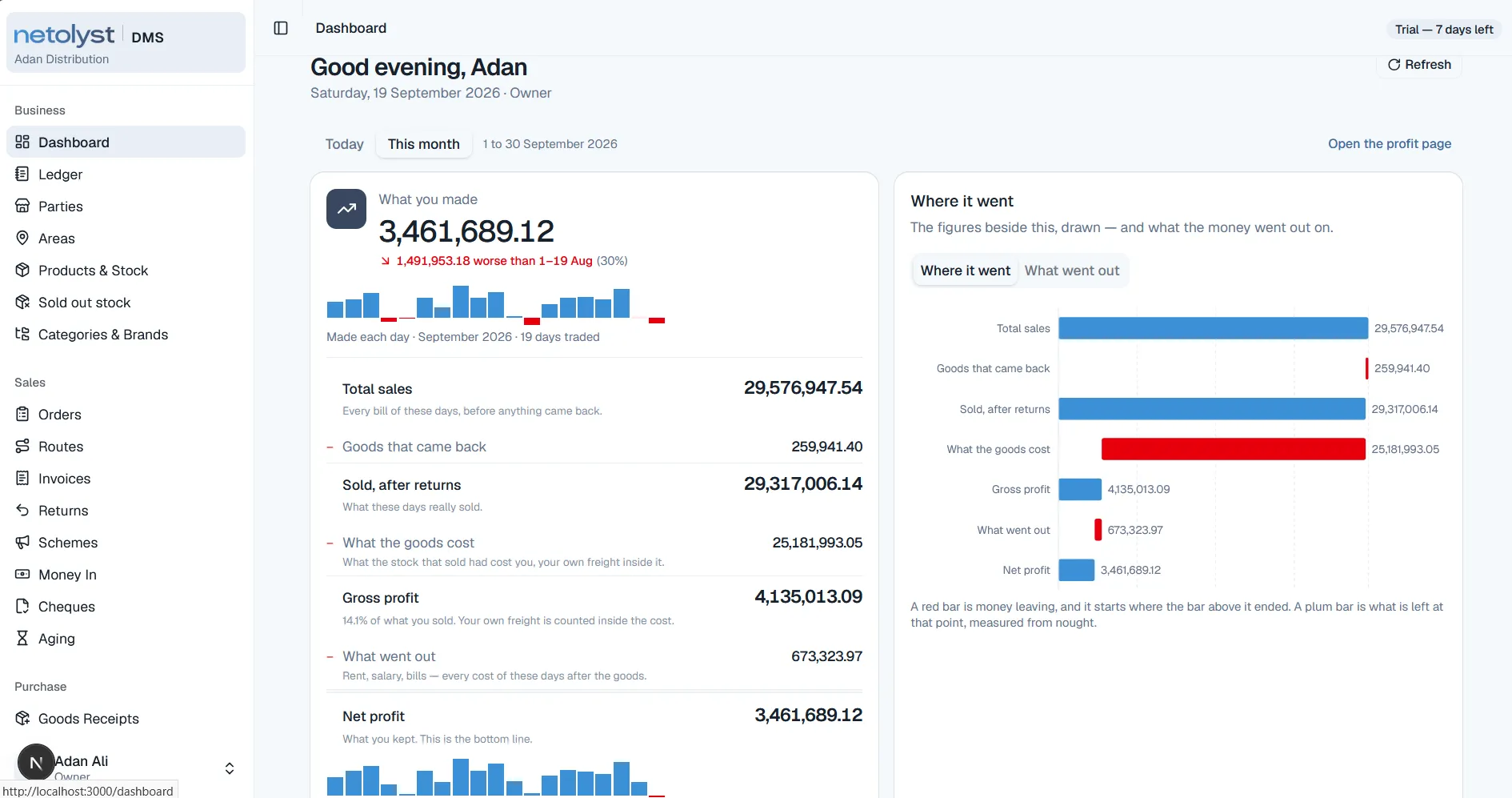
The owner opens one page. It does not ask him to run a report or choose a date range first — it opens on the month, and every figure on it is a way into the page that counted it.

01 Profit

What you made, and where it went

The month’s net profit, set against the same days of the month before.

Under it, the whole path down to that figure: total sales, the goods that came back, what the stock actually cost with your own freight inside it, gross profit, and what went out after.

  • Sales, returns, cost, gross, expenses, net
  • The same figures drawn beside the list
  • Every line opens the page that counted it
The Netolyst DMS dashboard showing net profit for the month, a breakdown from total sales down to net profit, and a bar chart of the same figures.

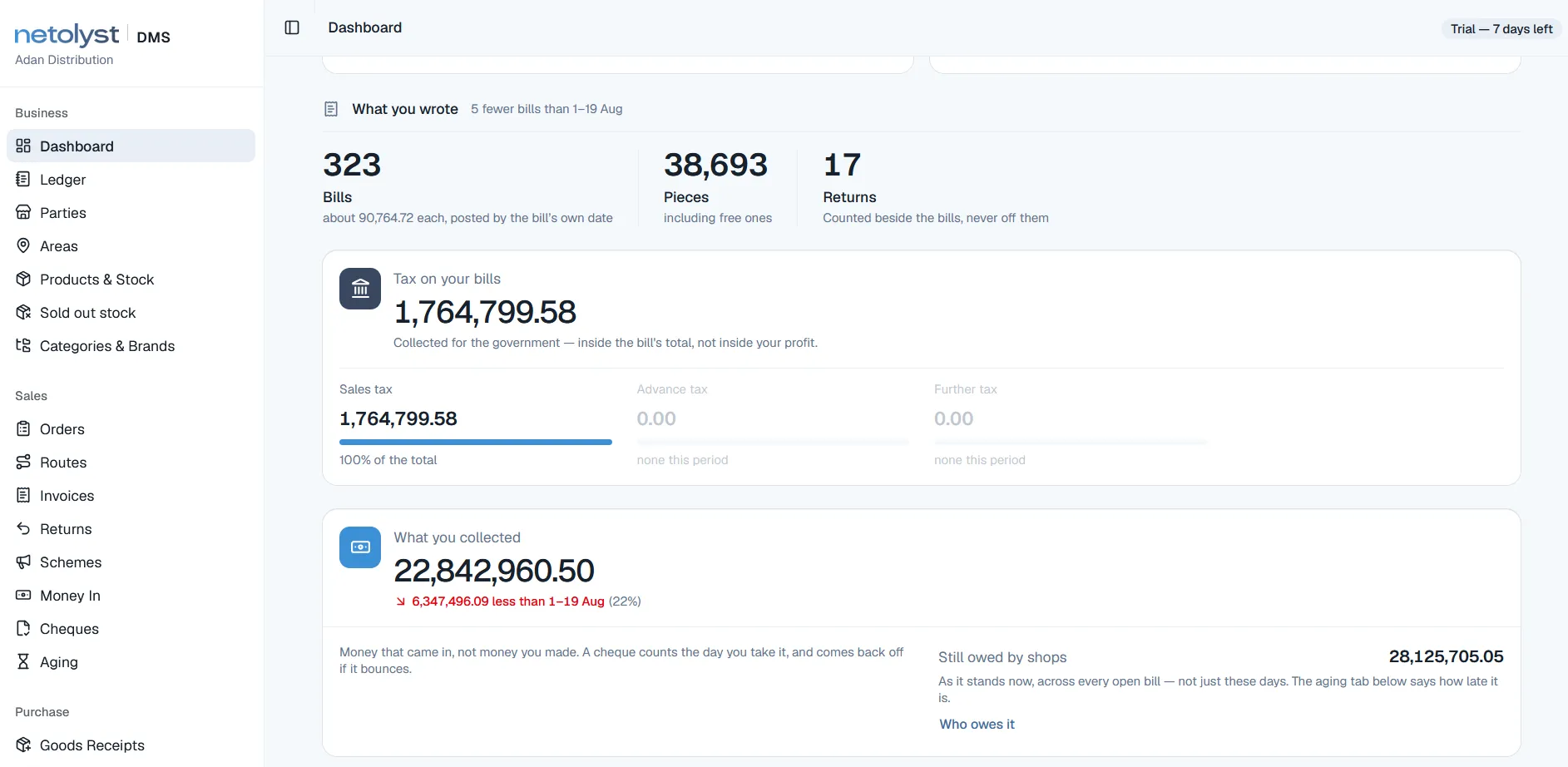
02 Cash

What you wrote, and what you collected

What actually came in, against what the market still owes you.

Bills, pieces and returns for the period, with returns counted beside the bills rather than quietly netted off them. The tax those bills carried is kept outside profit, because it was never yours.

  • Bills, pieces and returns, counted apart
  • Sales, advance and further tax, split
  • Owed across every open bill, not just this month
The dashboard showing bill, piece and return counts, tax split by levy, money collected, and the total still owed by shops.

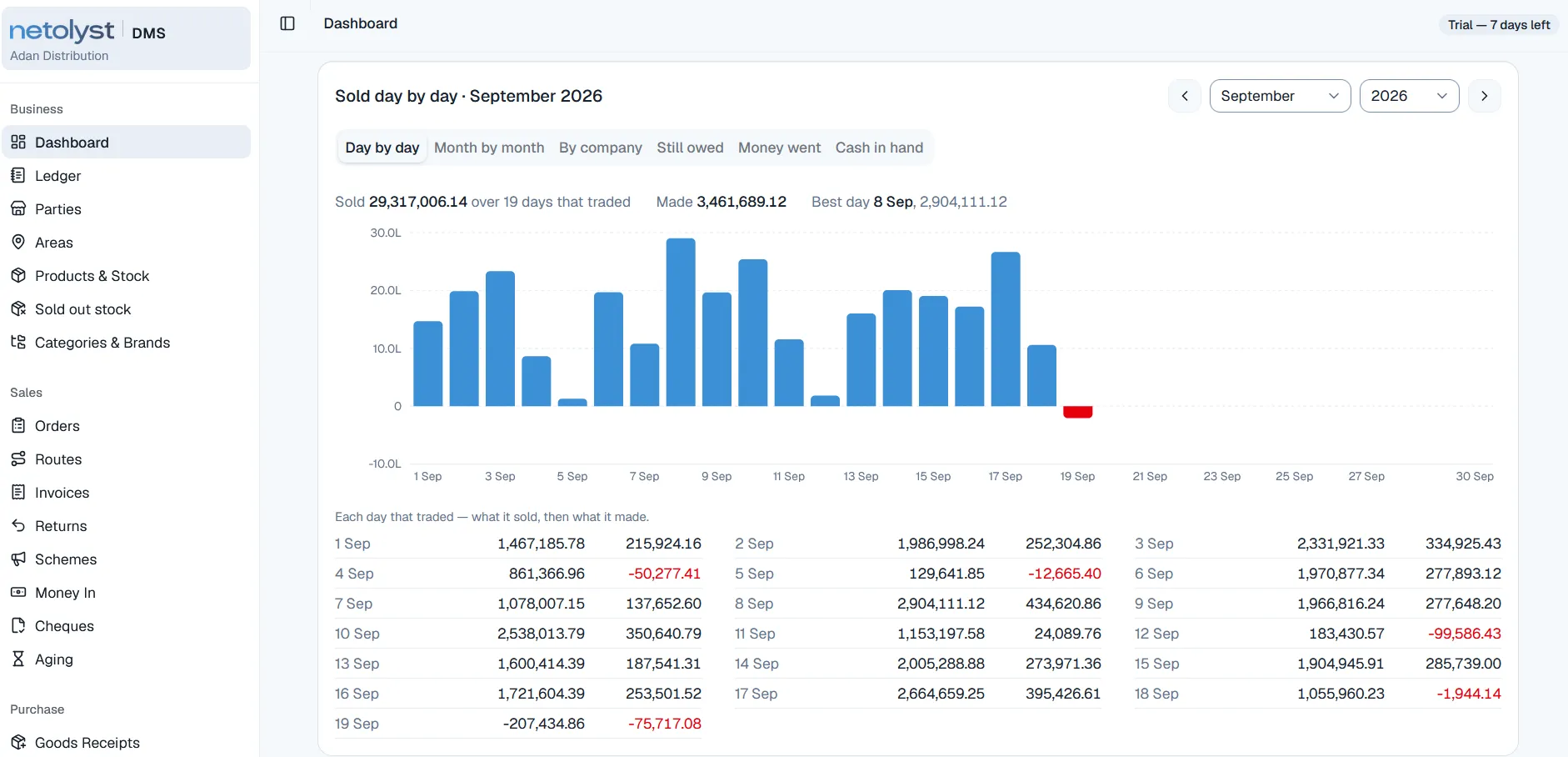
03 Trading

Every day that traded

Each trading day of the month — what it sold, and what it made.

The days that lost money stay red rather than being smoothed into an average, and the best day is named. The same period can be read five other ways without leaving the page.

  • Day by day, month by month, by company
  • Still owed, money went, cash in hand
  • Losing days in red, not averaged away
The dashboard showing a bar chart of sales for each day of the month, with a table of what each day sold and made.

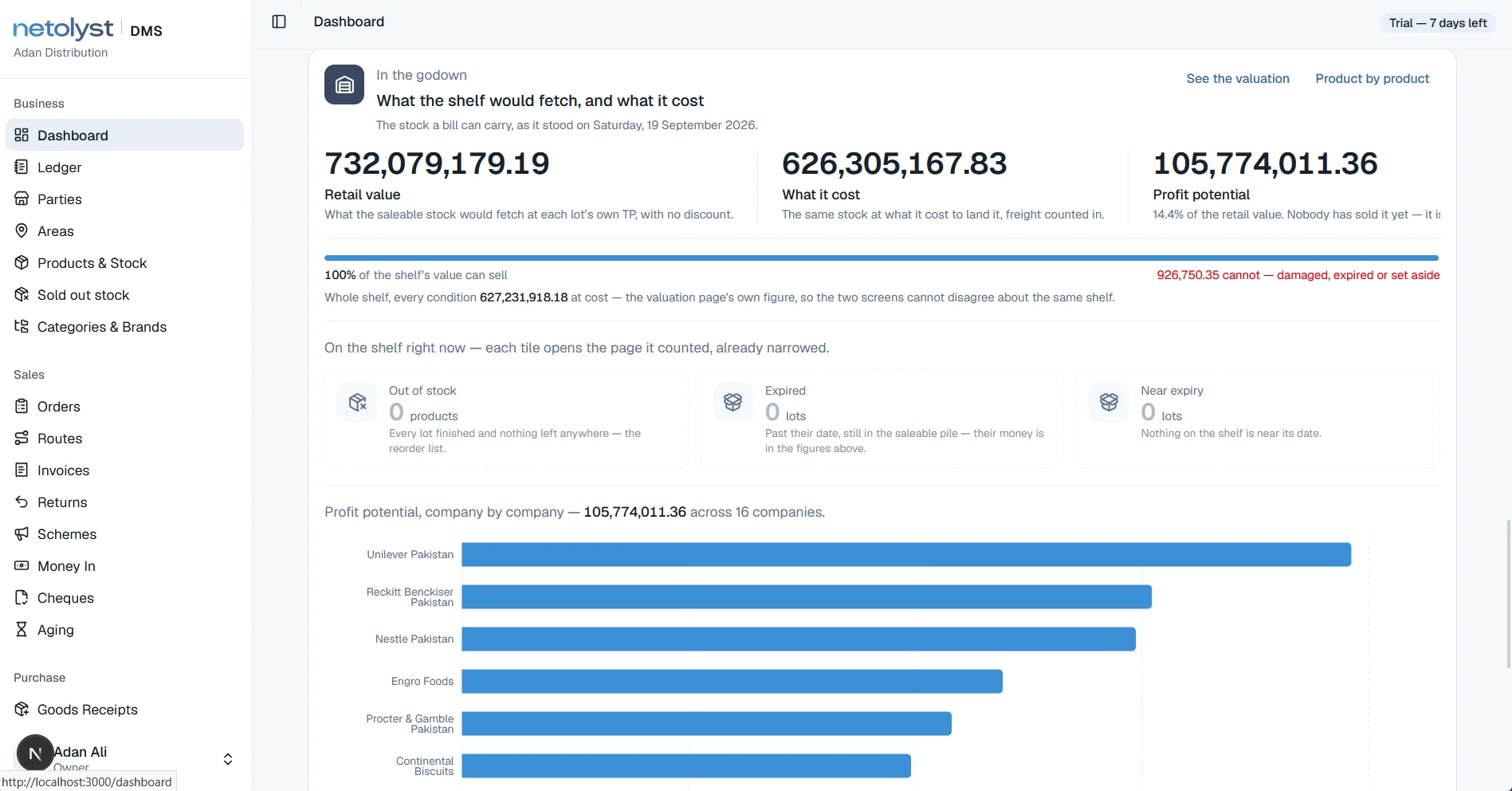
04 Stock

What is sitting in the godown

What the shelf would fetch, what it cost to land there, and the difference.

Out of stock, expired and near expiry are counted rather than estimated, because they come off the stock ledger itself — the same ledger the bills move.

  • Retail value at each lot’s own trade price
  • Landed cost, with freight counted inside it
  • Profit potential, company by company
The dashboard showing godown stock valuation at retail and at cost, counts of out-of-stock, expired and near-expiry lots, and profit potential by company.

These are real screens from the running product, captured on a demonstration business. The figures, the company names and the trading in them are demonstration data, not a customer’s books — no customer data appears on this page.

The working screens

The working screens your team uses every day.

The dashboard is what the owner reads. These are the four screens the people in the building actually work in — making a bill at the counter, receiving goods at the back, the stock sitting on the shelf, and one batch answering for itself.

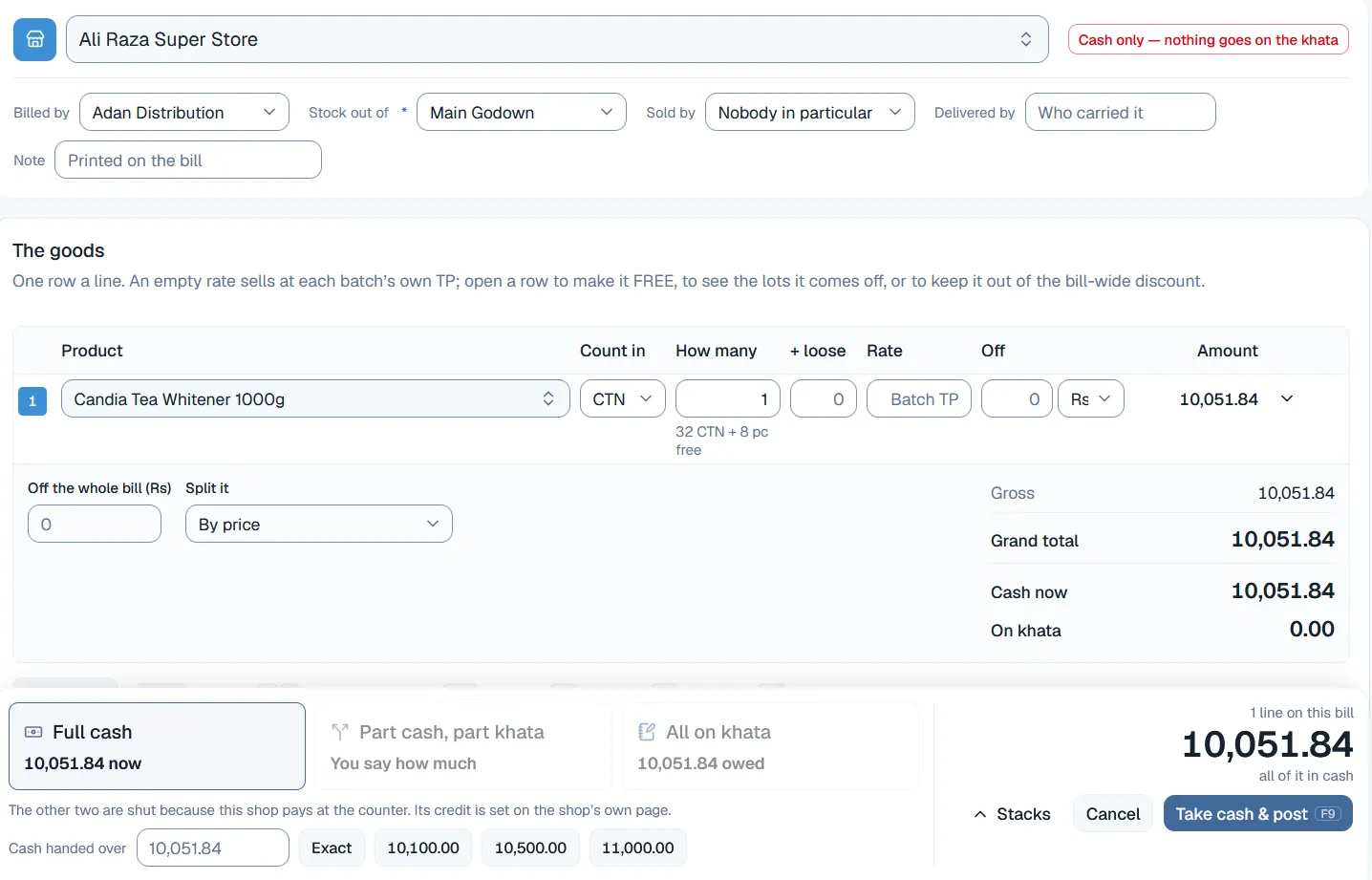
Web app · counter clerk

Making an invoice has never been this simple.

Choose the shop and the bill arranges itself around it. This shop pays at the counter, so the two credit options underneath are closed — not because the clerk decided it, but because the shop’s own page says so.

  • Cash only — nothing goes on the khataThe rule lives on the shop, where the owner set it. The counter cannot quietly overrule it in the middle of a sale.
  • Rate: Batch TPLeave the rate alone and each batch sells at its own price. Open the row to see the batches it is coming off, or to make the line free.
  • Cash now, and on khataEvery bill ends by saying what was actually handed over at the counter and what the shop still owes after it.
The invoice screen in Netolyst DMS: a shop selected at the top with a “cash only — nothing goes on the khata” flag, one product line counted in cartons with free pieces shown, and a footer offering full cash, part cash part khata, or all on khata, with the two credit options disabled.

Web app · storekeeper

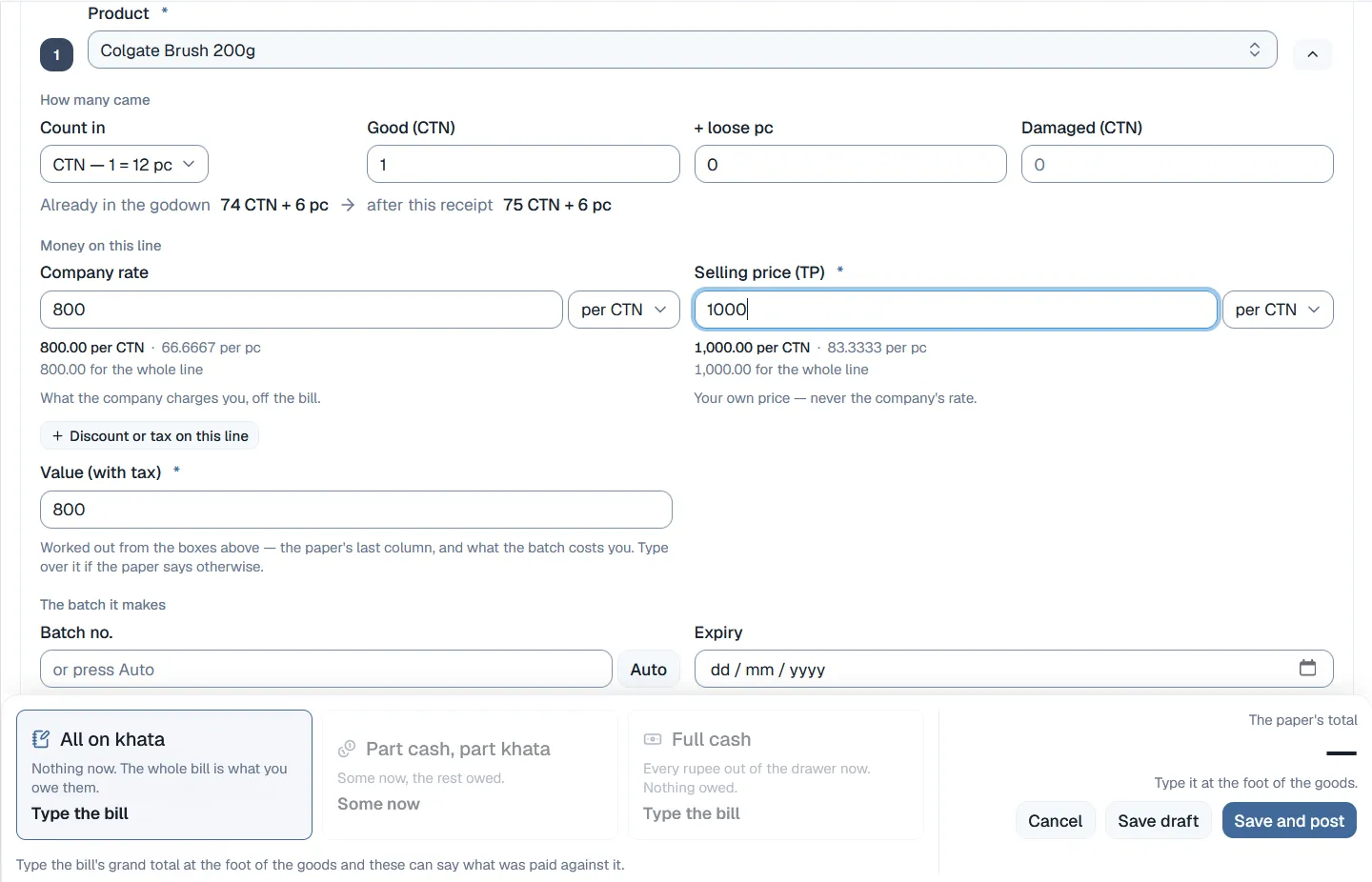
Receiving new stock is quick and easy.

A receipt line is entered the way the company’s bill is written: cartons, the loose pieces on top, and the damaged ones counted separately from the good ones. The godown count moves while you type.

  • Already in the godown → after this receiptThe shelf count before and after this line, shown while it is being typed rather than discovered once it is saved.
  • Company rate, and your own TPWhat the company charges you and what you sell at, per carton and per piece, held apart from each other and never averaged.
  • The batch it makesThe batch number and expiry are set here, so a piece sold months later still points back to this paper.
The goods receipt screen in Netolyst DMS: a product line with cartons, loose pieces and damaged cartons counted separately, the godown count before and after the receipt, the company rate beside the distributor’s own selling price per carton and per piece, and the batch number and expiry the line will create.

Web app · the office

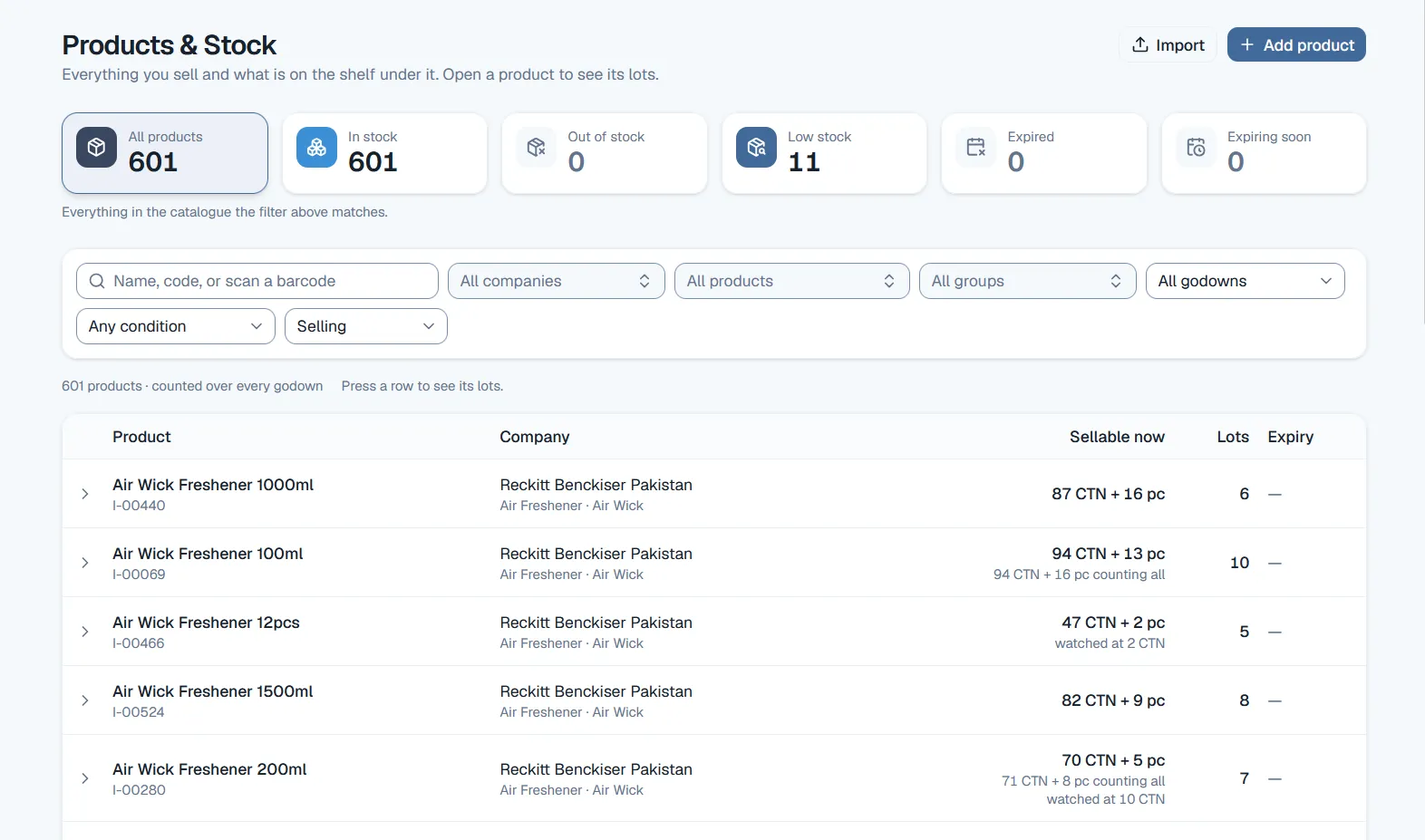
Complete inventory management, across every godown.

Six counts across the top and one row for every product: what can be sold right now in cartons and pieces, how many batches it is sitting in, and what is close to expiry. Press a row and the batches underneath open.

  • Low stock, expiring soonThe two lists a distribution house actually chases are counted at the top of the page, not buried at the end of a report.
  • Sellable nowCounted across every godown, with what is watched or held back shown quietly underneath the figure.
  • Batches per productA product is never one number here. It is the batches behind it, each with its own cost, its own price and its own date.
The Products & Stock screen in Netolyst DMS: counts for all products, in stock, out of stock, low stock, expired and expiring soon across the top, a filter bar beneath them, and a table of products with their company, what is sellable now in cartons and pieces, the number of lots, and expiry.

Web app · the owner and the accountant

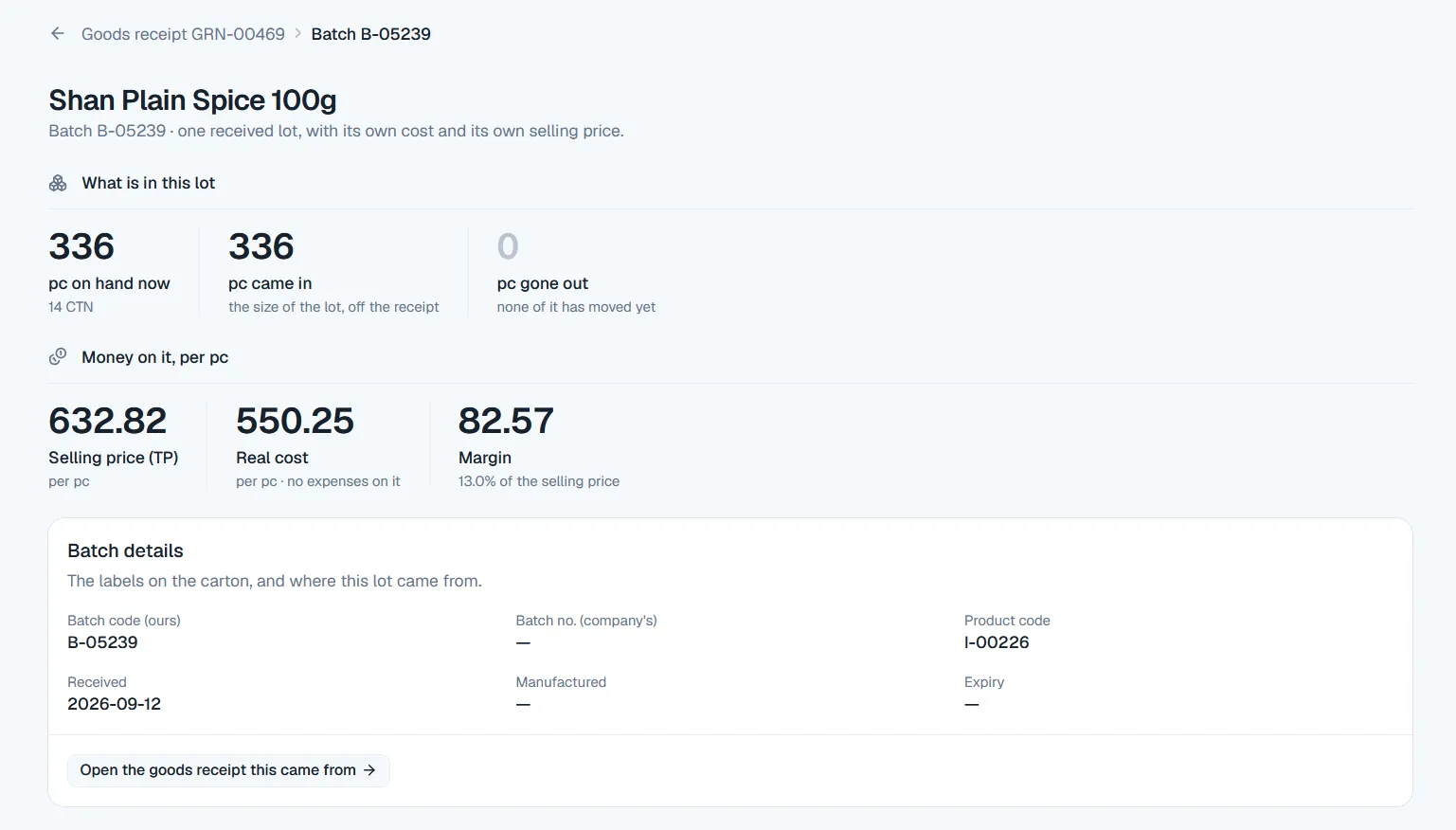
See the real cost and the real profit of every batch.

Open a batch and it answers for itself: what came in, what is left, what it truly cost once the expenses loaded onto it are counted, and what it earns on every piece. This is the figure the profit page is built from.

  • Selling price, real cost, marginPer piece, with the margin shown as a share of the selling price — the way a distributor argues about it, not the way a spreadsheet does.
  • On hand, came in, gone outThe batch’s whole movement on one line, so a shortage has somewhere to be looked for instead of somewhere to hide.
  • Back to the paper it came onThe batch code, the company’s own batch number and the dates, with a way back to the goods receipt that created the batch.
A batch detail screen in Netolyst DMS: pieces on hand, pieces received and pieces gone out for one lot, then its selling price, real cost and margin per piece with the margin as a percentage, and batch details including the batch code, the company’s batch number, the product code and the dates, with a link back to the goods receipt it came from.

As above, these are real screens from the running product captured on a demonstration business. The shops, companies and figures in them are demonstration data, not a customer’s books.

What you are actually buying

Four parts of the day, and what Netolyst offers for each part.

The salesman’s round, the stock in the godown, the money the market owes you, and the books behind all of it. Nothing below is a plan for later — it is written, tested and running in the product today.

01In the field

A booker app that works without the internet.

Your salesmen take the day’s orders on an Android phone that keeps working when there is no connection. Every order is saved on the phone first and is sent up by itself when the internet comes back — so nobody reads a list out over a call, and nobody types the same order again at the office.

  • Works with no internetA full day of orders with no connection at all. Nothing is lost if the app is closed or the phone is restarted.
  • Fast at the shop doorThe round, the shops, their balances and the product list are already on the phone. Taking an order is a few taps, not a phone call.
  • He sees what the shop owesEvery stop carries its own balance, so more credit is a decision taken at the door instead of a surprise at the office.
  • Schemes and rates go with himThe running schemes travel with the round, and every figure says how old it is: the rate is indicative, the scheme is likely, and the final bill decides both.
  • Each salesman sees only his ownSix roles and fifty-three separate permissions. A booker gets his own shops and nothing standing behind them.
  • One tap sends the morningOrders go up one at a time, each with its own key, so a lost reply can never turn one order into two.

It is also honest about itself: every screen shows how old its data is, it warns after three days without a connection, and after seven days it stops taking orders.

A FULL DAY, NO INTERNETTHE ROUNDSENDWHEN SIGNAL RETURNSoldest firstTHE OFFICENONE LOSTNONE DOUBLED
Android app · the order booker

02The godown

Every batch tracked with its own cost, price and expiry.

The same product received twice becomes two separate batches, and they are never mixed into one average. Nobody edits a stock figure here: every number is the total of the movements that made it, and every movement has a document behind it.

  • Two receipts, two batchesCosts are never averaged together, so what you earned on a carton is the truth about that carton and not about the shelf.
  • Oldest stock goes out firstPicking follows oldest-received-first, the way the trade already works, while expiry is watched separately and expired stock cannot be sold.
  • Expiry set per productMedicine needs ninety days of warning and a sack of rice needs seven, so the warning period belongs to the product.
  • Good, damaged, expired, heldEach counted separately, and in the godown it actually sits in — the main store, and the damage room the company’s man comes to inspect.
  • Counted blind, then approvedA count freezes a snapshot, the floor is counted without seeing the system figure, and the difference is posted only once somebody approves it.
  • What is about to finishLow-stock levels are set per product, so a fast-moving line is re-ordered before it runs out instead of after a shop has been turned away.

Transfers between godowns are documents too. Stock never moves in this system without leaving a record behind it.

ONE PRODUCT, THREE BATCHESBatch oneoldest — goes out firstBatch twoits own cost, its own priceBatch threeits own expiry dateTHE BILLLine 1 · from batch oneLine 2 · from batch twoEACH LINE, ITS OWN RATEEXPIRY WATCHED
Web app · the storekeeper

03The money

Complete ledger management, for every shop and every company.

Shops pay round amounts against no particular bill, and they pay late. The ledger here is built for exactly that. Every party has a running account like the one in the register, money is spread over the open bills by itself, and you can see how old every unpaid amount is the moment you look.

  • One payment, old bills firstThe collector records what the shop handed over. The system settles the oldest open bills first instead of asking him to choose one.
  • Two accounts for one partyWhat a shop owes you and what you owe a company are kept in separate books, and are never quietly mixed together.
  • Overdue is calculated, not rememberedNot due, 1–30, 31–60, 61–90 and 90+ days, worked out from what is left on each bill — so a part-paid bill only ages the amount still outstanding.
  • Credit limits, and a key to cross themA credit limit, credit days and a limit on open bills for every party, with a separate permission for whoever is allowed to go past them.
  • Cheques are followed to the bankReceived, deposited, cleared — or bounced with a reason that stays beside the entry instead of erasing it.
  • Your old balances come inThe closing figure from your paper register becomes the first line of each party’s account and stays fixed there.

An amount the business finally gives up on is written off through its own screen, with its own permission and its own reason, and goes to bad debts instead of quietly reducing last quarter’s sales.

ONE PAYMENT, THREE OPEN BILLSA round figureagainst no named billOldest billclearedThe next onepart paidThe newestuntouchedSPREAD OLDEST FIRSTNOTHING TAGGED BY HAND
Web app · recovery and the accountant

04Behind all of it

Accounting that writes itself while you work.

In Pakistan there is no second accounting program to hand the ledger to, so this one keeps it. Every document that touches money writes its own double-entry record at the moment it is saved — which is why nobody types an accounting voucher here, and why month-end becomes reading rather than rebuilding.

  • Nobody types an entryThe bill, the receipt, the goods receipt and the expense each post their own accounting entry as they are saved.
  • The books always balanceEntries add up to exactly zero by design, and the whole journal can be rebuilt from the documents — so the books can be checked, not just trusted.
  • The day is counted, not assumedOpening cash plus cash in minus cash out is what the system expects; the cashier enters what was actually counted, and any difference needs a reason.
  • Forty-seven reports, one date rangeTick what you want to read and take it out together — one Excel file with a tab for each, or one sheet the browser turns into a PDF.
  • Every company gets its own statementOpening plus received minus sold minus returned, in cartons and in rupees, ready for the company’s area manager when he arrives.
  • Cost and profit stay privateA counter clerk can make bills all day without ever seeing what a carton cost, or what the owner took out of the business.

Several firms can sit inside one business — their own NTN, their own invoice letters, their own bank accounts — reporting together and filing separately.

NOBODY TYPES A VOUCHERThe billThe receiptGoods inThe journalwritten, not typedThe statementsP&L, balance sheet47 reportsone date rangeIT BALANCES BY CONSTRUCTION
Web app · the owner and the accountant

What it does

Thirteen things it does from taking the order to closing the books.

Every capability below is written, tested and running in the deployed product today — not a roadmap, and not a promise.

The field01–03

Take orders without internet

The booker carries an Android phone that already holds his shops, their balances, the product list and the current schemes. He can take orders with no internet at all. They are sent as soon as the phone is back online.

How it works

The phone keeps its own encrypted database and works entirely from it. Each order goes into an outbox under a key the phone mints, sent one at a time, oldest first; a lost reply and a retry produce one order on the server, never two, because the key is checked inside the same transaction that writes the order. Kill the app mid-send and nothing is lost. Nothing leaves the phone until the booker taps Send. Every figure carries its own age — a rate is indicative, a scheme likely, the stock signal shows when it was downloaded — and the app warns at three days behind and stops taking orders at seven.

The order booker, all morning, on his own phone.

Routes and daily shop visits

A route is one booker’s list of shops, in the order he visits them. You set which shops are on it, which days of the week it runs, and who walks it. Build a route by picking shops and dragging them into order.

How it works

A shop may sit on more than one round, which is the normal case for a house holding several dealerships. The office sees, per round, which calls produced an order and which produced a reason there was none — the number behind “sixty calls made forty orders”. A round is never deleted while anything has used it; it is deactivated. There is deliberately no GPS trail, no check-in and no dwell time: the one place the app reads location is the pin it drops when a booker registers a shop that was not on the list.

The sales manager builds and re-cuts rounds; the booker walks them.

The office approves every order

An order from the field arrives as a request. It does not hold any stock yet. The office either accepts it, choosing the godown and reserving the stock at that moment, or rejects it with a reason the booker reads on his phone.

How it works

This is deliberately not “the phone reserves stock”. A phone that has been offline for four hours cannot know what is on the shelf, so a booking carries no godown, no price and no hold; it carries a number, so the office can quote it back the same minute it lands. The hold is taken at accept, against a real godown, by the same availability check the counter uses. While nobody at the office has answered, the booker may change the whole cart or take the request back — after that, he rings the office, and the screen says so.

The order desk, first thing in the morning.

Order to cash04–07

Invoices, batch by batch

The invoice is the only thing that takes stock out of the godown. It is saved in one step. The oldest batches are used first, each batch becomes its own line with its own rate and expiry date, and tax and discounts are calculated on the server.

How it works

Twenty pieces coming off two lots become two lines, each carrying its own batch code, expiry date and trade price, because that is what the shop is actually handed. Price warnings fire against the batch’s own trade price, and a second, quieter warning against landed cost that only staff with the cost right ever see. A bill is immutable once posted: the correction is a void and a re-bill, which reverses the stock, credits the khata and leaves the original standing. Each firm bills under its own letters and its own number series. Bills print A4 with the firm’s own logo.

The counter clerk, all day; the owner when he prices something himself.

Company schemes applied automatically

You type the company’s scheme letter in once: which product, whether it gives free goods or a percentage, an optional limit, the company’s share, and the start and end dates. After that, every invoice applies it on its own.

How it works

The dates are the status: there is no “activate” button to forget. A scheme’s rule freezes the moment a posted bill uses it, so changing the terms makes a new scheme rather than rewriting history. The free carton is drawn from the same stock queue the paid ones came from, never out of thin air. The counter man may take a scheme line off a bill with a reason, and can never change its quantity. When a shop returns cartons that earned free goods, the return claws them back unless a scheme manager waives it. A report then shows what each scheme gave, net of returns, and under it a “no scheme” row for the free goods nobody promised.

Whoever handles the company’s letters; the counter sees the result.

The khata: two accounts per party

Every party has a running account that works like the paper khata. Rows are only added, never changed, and each row shows the balance after it. If a party is both a shop and a supplier, it keeps two separate accounts, and the two are never added together.

How it works

Money is taken the way shops actually pay — a round figure against no named bill — and the system spreads it over the open bills oldest first rather than asking the collector to tag one. Goods handed back settle a bill the same way money does. What the khata is debited is what the shop will actually hand over, which is not always the bill’s total: where a registered buyer withholds sales tax and deposits it himself, that comes off what he pays without changing what the bill is worth. Old balances from the paper register come in as line one of the book and freeze there. Statements print and export.

The accountant daily; the owner whenever he asks what the market owes.

Credit limits and overdue payments

Each party can have a credit limit, a number of credit days, and a maximum number of unpaid bills. Only staff with the right permission can go past them. Overdue amounts are worked out the moment you open the screen, so nothing has to be refreshed by hand.

How it works

A party can be marked cash-only, and the sales side refuses credit for it until somebody with the right key changes that, with a reason. Due dates fall out of the bill’s date plus the party’s own credit days, with the house default filling in where a party has none. The receivables ladder — not due, 1–30, 31–60, 61–90, 90+ — is built from each bill’s own remainder, so a part-paid bill ages only what is left. A balance the house gives up on is written off through its own door, with its own permission and its own reason, and the loss lands in bad debts rather than quietly shrinking last quarter’s sales.

The recovery staff and the accountant; the owner sets the limits.

Stock and buying08–09

Stock by batch and by godown

Stock is kept as a list of movements in and out, recorded for each batch, each godown and each condition: saleable, damaged, expired, or held back for checking. Every balance is the total of those movements. Nobody can edit a stock figure directly.

How it works

Each received lot keeps its own cost and its own trade price; the same product received twice is two batches, never averaged. Picking is oldest-received-first, which is Pakistani practice, while expiry is still tracked and expired stock stays unsellable. Godowns include the real ones — the main store, the damage room the principal’s man inspects — and transfers move goods between them as a document. A stock count freezes a snapshot, is counted blind, shows the variance, and posts adjustments on approval. Damaged goods can be re-graded onto the line of an adjustment note. Low-stock levels and expiry-warning windows are set per product, because medicine wants ninety days’ notice and a sack of rice wants seven.

The storekeeper; the manager who watches what is about to run out.

Purchases and goods received

The goods receipt is the company’s bill, typed in as it reads: quantities, cost, trade price, the tax columns printed on the paper, and the freight. All of it is added into the cost of that batch. Purchase returns, supplier credits and money-only corrections are all linked back to it.

How it works

Goods can arrive three ways and the system asks which: on the company’s account, with no bill yet (the goods wait in quarantine, counted and visible but unsellable until the bill arrives and costs them), or with no bill ever coming. Freight and unloading are allocated into cost by value, equally or by quantity. Where the total typed off the bottom of the paper disagrees with what the rows add up to, the gap is recorded and confirmed with a tick rather than blocked, and it moves the payable, never a carton’s cost. Goods sent back go against the exact lots the paper names, and are worth the company’s own price, not ours.

Whoever receives stock, with the company’s bill in hand.

Money and the books10–13

Cash, cheques and daily closing

Every rupee goes to a real place: a named cash counter or a firm’s bank account. Each one keeps its own book, and that book can never go below zero. Cheques are followed from the day they are received until they clear or bounce, and every day is counted and closed.

How it works

A cheque moves from received to deposited to cleared, or bounces with a reason; the shop’s khata is credited when it is taken, and the bounce is the scratch beside it, while the bank book counts it only when it clears. Expenses are recorded against a category the house manages, and the owner’s own withdrawals are equity rather than expense, so a withdrawal can never make the night’s profit read low. A day close is one cash point’s one day: opening float plus cash in minus cash out is the expectation, the cashier types what was counted, and the variance always needs a reason — above a threshold, a second person — and never blocks the close.

The cashier at the end of the day; the accountant the next morning.

Accounts written automatically

Every document that involves money writes its own double-entry accounting record at the same moment it is saved. Nobody has to type a voucher. The profit statement, the balance sheet and the cash flow are simply totals taken from those records.

How it works

The chart of accounts is owned by the software and cannot be edited into a mess. Entries balance to exactly zero by construction, which is why the balance sheet balances. Fixed assets carry at cost less depreciation, charged by a document and never invented on a schedule nobody ran; a bank borrowing is one account split into current and long-term when it is read; what a bank charges is recorded when its advice arrives rather than accrued by guesswork. The statements print as A4 and download as a workbook, in the plain version and again in the shape a bank expects. A replay rebuilds the journal from the documents alone, so the books can be checked rather than trusted.

The accountant; the owner reads the profit page.

47 reports, in Excel or print

There are 47 reports. Choose one date range, tick the reports you want, and take them together: as a single Excel file with one tab per report, or as one print sheet your browser saves as a PDF.

How it works

Two of them exist for the visitor nobody plans for. The principal statement is the page a company’s own man is handed instead of the owner’s register: per company, per period, opening plus received minus sold minus sent back, in cartons and in rupees — built from the stock ledger, because what he argues about is cartons. The credit list is what he gets when he says our money is lying in your market: one row per bill of the period that carried his goods, with what is still outstanding. Per-product reports answer the same questions at a grain the statements cannot: best and worst sellers by net sales, days of cover, what is expiring, sales by salesman.

The owner, the accountant, and — indirectly — the principal’s area manager.

Users, permissions and audit log

Each business has six roles and 53 separate permissions, and you can give one user an exception on top of their role. Everything anyone changes is written to a log that cannot be edited. Seeing cost and seeing profit are their own permissions.

How it works

One business can hold several firms — separate tax entities with their own NTN, invoice letters and bank accounts — reporting together and filing separately. Nobody can grant a permission they do not hold themselves. Staff sign in with a password, or with a phone number and a PIN on a shared machine, and switching user on that machine is a PIN away. What a batch cost, what the margin is and what the owner withdrew are each behind their own permission, so a counter clerk can bill all day without ever seeing what the carton cost. Users are suspended, never deleted, so their documents keep their author.

The owner and whoever he trusts with the admin screens.

How it works

Entered once at the shop door, and never typed again.

This is the real sequence inside the product, not a drawing of one. Notice what is missing from it: nobody types the same thing twice. The carton the booker wrote down at the shop door is the same carton on the bill, the same carton in the stock ledger, and the same rupees in the khata and on the profit page.

TYPED ONCECARRIED — NOBODY TYPES IT AGAIN20 pcsShop doorBooker · offline20 pcsThe officeOrder desk20 pcsThe invoiceCounter20 pcsThe khataCashier20 pcsThe booksNo one
One order line. Five places it has to land. One keyboard.
  1. 01

    The route is planned

    You pick the shops, drag them into the order they will be visited, choose the booker who walks the route, and set which days of the week he walks it.

    Sales manager Web app

  2. 02

    Orders are taken at the shop

    From its last download the phone already holds the route, the shops, their balances, the product list and the current schemes. Orders are taken with no internet.

    Order booker Android app, offline

  3. 03

    The orders are sent

    The booker taps once and the morning’s orders go up one at a time. Each one carries its own key, so a lost reply can never create the same order twice.

    Order booker Android app → API

  4. 04

    The office accepts or rejects

    Accepting the order chooses the godown and reserves the stock at that moment. Rejecting it sends back a reason, which the booker reads on his phone.

    Order desk Web app

  5. 05

    The invoice is made

    The invoice is saved in one step. The oldest lots are used first, each on its own line at its own rate. Schemes are checked again against the invoice date, and tax and discounts are calculated on the server.

    Counter clerk Web app

  6. 06

    The payment is received

    The shop’s khata is charged what it will actually pay. Cash, a transfer or a cheque goes into a named drawer or a bank account. At the end of the day the drawer is counted and closed.

    Cashier Web app

  7. 07

    The books are already written

    Each document wrote its accounting entry at the same moment it was saved. So the profit page, the balance sheet, the overdue ladder and each company’s statement are all built from documents that nobody typed twice.

    No one Reports and the report pack

By the end of this loop the business can answer, in one look, three questions it could not answer before: how much the market owes and how old that money is, how each company’s goods sold this month in cartons and in rupees, and what the business really earned after what the goods really cost.

Fit

Who it was built for, and who it was not.

FMCG and consumer goods distribution

The shape the product was built around: a house holding two to four dealerships, selling in cartons and pieces to hundreds of kiryana shops on credit, through bookers on fixed rounds. What that demands, and what is built, is per-principal everything — the catalogue partitioned by company, stock commingled in one godown but reported per company, a statement per principal in cartons and rupees, and a damage godown that is a real separate place because the principal’s man inspects it.

Built for this shape of business

General wholesale and trading

A wholesaler without formal dealerships uses the same machinery with less of it: batches with their own cost and rate, multiple godowns, the running khata, cheques and the day’s close, and the same books. What does not apply is the per-principal reporting — the statement and the credit list a company’s man asks for. A business like this can ignore both, since the supplier is just a party and the catalogue is partitioned by whoever supplied it.

Designed for — a subset of the same model

Pharmaceutical distribution

Partly, and the limits matter more than the fit. What is there: an expiry date on every lot, expired stock that cannot be sold, a per-product warning window — ninety days for medicine where a sack of rice wants seven — and an expiring-stock report. What is not: picking is oldest-received-first rather than nearest-expiry-first, which is Pakistani trade practice and the opposite of what a pharma operation wants, and there is no DRAP handling, serialisation, track-and-trace or recall workflow.

Exploratory — tell us before a demo, not after

Four trades have a page of their own, each written with the fit and the limits side by side: FMCG and consumer goods, food and grocery, pharmaceutical, and electronics and appliances.

Commercial model

One product, one price, and no figure yet.

The shape is decided. One product with everything in it, priced in Pakistani rupees for a term you choose — monthly, half-yearly or yearly — quoted as one price for the whole term rather than a monthly rate. There are no tiers: no Starter, no Pro, no Enterprise, and no feature gating by price. Everything described on this page is in the product for everyone who has it.

There are fair-use limits on users and firms, the same on every paid term. A limit here is not an upsell, because there is nothing to sell up to; it is the honest reason a business that has outgrown the product has a conversation with us instead of quietly costing us money.

There is no published figure on this page. A 14-day free trial does exist and gives you a complete working system rather than a sandbox, so you can see it before any conversation about money. For a quote, talk to us — we would rather price against your size than publish a number we would have to revise.

Sold in Pakistan. The product is reachable from anywhere, but it is built for one market: rupees only, Pakistani trade and tax vocabulary, and an answer that comes from Pakistan.

Frequently asked

Questions, including the awkward ones.

Ask us something else
What is a distributor management system, in plain terms?

It is the software a distribution business runs its selling on: the salesman’s route and the orders he takes, the stock in the godown, the invoice to each shop, the credit account behind it, and the trade schemes the manufacturer funds. It covers what happens after goods reach the distributor and before they reach the shelf — the part the manufacturer’s own systems cannot see and a retail till never records.

How is this different from an ERP or from an accounting program?

An ERP is built for a manufacturer’s own production and purchasing; an accounting program knows money but not cartons, routes or batches. A distributor management system is built for the middle: goods bought from several companies, sold in small quantities to many shops, mostly on credit, through people who walk. Netolyst DMS keeps the accounts itself rather than handing them to a second program, because in Pakistan there is no standard second program to hand them to.

Can my order booker take orders where there is no signal?

Yes — that is what the Android app is for. It holds his round, his shops and their balances, the catalogue and the running schemes from its last download, and takes orders with no internet at all. They sit on the phone until he taps Send. No order is lost if the app is killed or the phone restarts, and no order arrives twice if a reply is lost on the way back. Every figure on screen shows how old it is.

Do I still need a separate program for my khata and accounts?

No. The party khata is in the product — a running account that behaves like the paper one, where a round-figure payment against no named bill is spread across the open bills oldest first. Underneath it, every money document writes a double-entry journal entry as it posts, so the profit page, the balance sheet and the cash flow come out of the same transactions. Nothing is exported to an accounting package and nothing is retyped into one.

I hold three companies’ dealerships. Does it keep them separate?

Yes, and that is an organising idea in the product rather than a tag on a record. The catalogue is partitioned by company, and the same product from two principals is two items. Stock sits commingled in one godown physically but reports separately. Each company can be handed its own stock-and-sale statement, in cartons and in rupees, and its own list of what is outstanding in the market on bills that carried its goods. Balances never net across companies.

Is it integrated with FBR digital invoicing?

Not yet, and this is the most important limitation to know before talking to us. There is no live FBR connection, no IRN and no QR on the invoice. What exists today is a per-product setting that records which products it will apply to when the link is built; tax is charged and printed on our own invoice in the meantime. Nobody should buy this today on the expectation of e-invoicing being live on a particular date, because no date is committed.

What happens if a bill is wrong? Can I edit it?

No, and deliberately so. A posted bill is immutable. The correction is to void it with a reason — which reverses the stock, credits the shop’s khata and releases the money to spread again — and then cut a new bill, which can be prefilled from the old one. The original stays on the record. This is inconvenient once and right every time afterwards, because the alternative is a document that changed after somebody acted on it.

A shop returns cartons it got free goods on. What happens to the free ones?

The return claws them back. When cartons that earned a scheme’s free goods come back, the shop no longer earns what those cartons earned, and the return is refused if it would leave the shop holding more free goods than it still qualifies for. Somebody with the scheme permission can waive that, with a reason on the record. The schemes report then shows what was actually given over a period, net of returns, so a clawed-back carton is never claimed from the company.

How many distributors are using it?

It is running real distribution businesses today — the field app, the counter and the books, in daily use. We are not publishing a customer count or naming customers on this page, because we would rather talk about your operation than ours. What an early customer gets is direct access to the people who built the software and real influence over what gets built next.

Does it handle delivery, van sales and the supplyman’s collection at the door?

Not today. The bill is cut at the office; there is no van-stock module, no load sheet, and no app for the delivery man to collect cash against. A bill can record that it was settled in cash, in part or in full, at the time it is entered — but the delivery run itself is not managed by the software. If your business is primarily ready-stock van selling rather than book-and-supply, this is not the right product yet.

Who can see what a carton cost me, and what my margin is?

Only the people you give those keys to. Cost, margin and the owner’s own withdrawals are three separate permissions, none of which comes with seniority — a counter clerk can bill all day and never see a cost, and a manager can run the floor without seeing the margin. Where a hidden figure sits inside a total that must still add up, the line is masked rather than removed: a cash book that does not balance is worse than one with a line you may not read.

Can I bring in my old khata balances and my current stock?

Yes. Shops and products import from CSV templates. Each party’s old balance comes in as the first line of their book and freezes there, so it can never be quietly edited afterwards. What is owed to each company comes in the same way on the buying side. Cash and bank openings are the first line of their own books. Stock comes in as ordinary goods receipts, which takes longer than a bulk upload and is what gives every lot a real cost and a real rate from day one.

What does it cost?

We have not published a price, because we have not set one. The shape is decided: one product with everything in it, priced in rupees for a term you choose — monthly, half-yearly or yearly — with no tiers and no feature gating. There is also a 14-day free trial you can start yourself. For a figure, talk to us; we would rather quote after understanding your size than publish a number we would have to revise.

Does it work on a cheap phone, and is it in Urdu?

It runs on Android 7.0 and above, which covers the low-end handsets field staff actually carry, and the field app is a small download built to work on a shared phone with one booker signed in at a time. The interface is English only today. Shop and owner names are stored and shown in Urdu where that is how they are written, with their own right-to-left line, and the English throughout is written in plain trade words rather than software English.

Talk to us

Bring us one round and one godown.

Tell us how many shops, how many companies and how many bookers. You will hear back from the people who built it, not a sales desk.

Built for a distribution house in Pakistan holding one to four dealerships and billing in rupees. Not for grid distribution, freight or courier logistics, and not for a brand looking to roll software out across its distributor network.

Let’s connect