Sales
The bill is the only document that takes sellable stock out of your godown, and it takes from the oldest batch first. Voiding a bill puts back exactly what it took. Free scheme goods come off the same stock as the paid cartons.

Part of Netolyst DMS
Netolyst DMS keeps stock the way your godown really works. Count in cartons and pieces. Give every batch its own cost, price and expiry date. Keep the main store and the damage room apart. Every figure comes from a real document, so nobody can change it by hand.
Everything on this page is part of Netolyst DMS — the same system that takes your salesman’s order, makes the bill, keeps the shop khata and writes your accounts. There is no stock-only version to buy. Stock is not a separate problem in a distribution house: the bill is what removes it, the goods receipt is what gives it a cost, and your accounts read from both.
If you want to see the whole business and not only the godown, start with the full list of what it does and come back here for the stock detail.
What it is
It means knowing what is in your godown right now, what each carton cost you, which batch it belongs to, when it expires, and what your whole stock is worth — accurately enough to make a bill from and to close a month on.
A distributor does not manufacture anything. You buy full loads from two or three companies, break them into cartons and pieces, and sell them to hundreds of shops on credit. Then the company asks you what arrived, what sold and what came back.
So you do not need rack numbers or pick paths. You need five answers: how much of this product can I sell today, which batch will it come from, what did that batch really cost me after freight, how close is it to expiry, and what is my whole godown worth.
Netolyst DMS answers all five. What happens on the selling side — the route, the order and the bill that takes the carton off your shelf — is covered under sales management.
The problem
Most distributors in Pakistan keep stock in a register, in Excel, or in a billing program that knows quantities but not batches. Here is what goes wrong, and why it happens.
A register is written when somebody remembers to write it. By the afternoon it is a few bills old. So the counter promises goods you do not have, and holds back goods you do have.
When two loads bought at different rates are mixed into one average rate, every profit figure becomes a guess. You can no longer say whether that load made money.
Bilty, labour and unloading are paid in cash and written down as an expense. The carton cost stays at the company rate. So the profit on paper is higher than the money in the bank.
A register does not know dates. You find near-expiry stock when a shop refuses it, or when the company man opens a carton. By then the claim window has usually closed.
Damaged and returned goods sit in a separate room that nobody counts. Your godown total is wrong in one direction, and your claim on the company is wrong in the other.
When the company area manager asks for opening, received, sold, returned and closing, somebody spends a day adding up a register. And nobody can defend that figure line by line.
How it works
You never type a stock figure in Netolyst DMS. The documents you already make — a goods receipt, a bill, a return, a transfer — move the stock for you, against a batch, a godown and a condition. The balance you see is the total of those movements. There is no screen anywhere that lets somebody type a new quantity over the old one.
| Document | When you use it | Stock | What you get |
|---|---|---|---|
| Goods receipt | Goods arrive from the company, with their bill | In | A new batch with its own cost, selling price and expiry date |
| Opening stock | Your godown on the day you start, entered as normal goods receipts | In | A real cost and a real rate on every lot from day one |
| Invoice | You sell to a shop | Out | Stock reduced from the oldest batch first, batch by batch |
| Void | A bill was wrong, so you reverse it instead of editing it | In | Exactly the batches that bill removed, back on the shelf |
| Sales return | A shop hands cartons back | In | The bill settled like a payment, and any free scheme goods taken back |
| Purchase return | You send goods back to the company | Out | The exact lots named on the company paper, at the company price |
| Godown transfer | Goods move from the main store to the damage room | Out, then in | Two movements under one document, so stock never moves without a record |
| Stock adjustment | A counting difference, or goods re-graded as damaged | In or out | The correct condition updated, with a reason and an approver attached |
Because every figure is built from documents, a shortage can be traced. The question stops being "who changed the number" and becomes "which document is missing". That is a question the system can answer for you.
Receiving goods
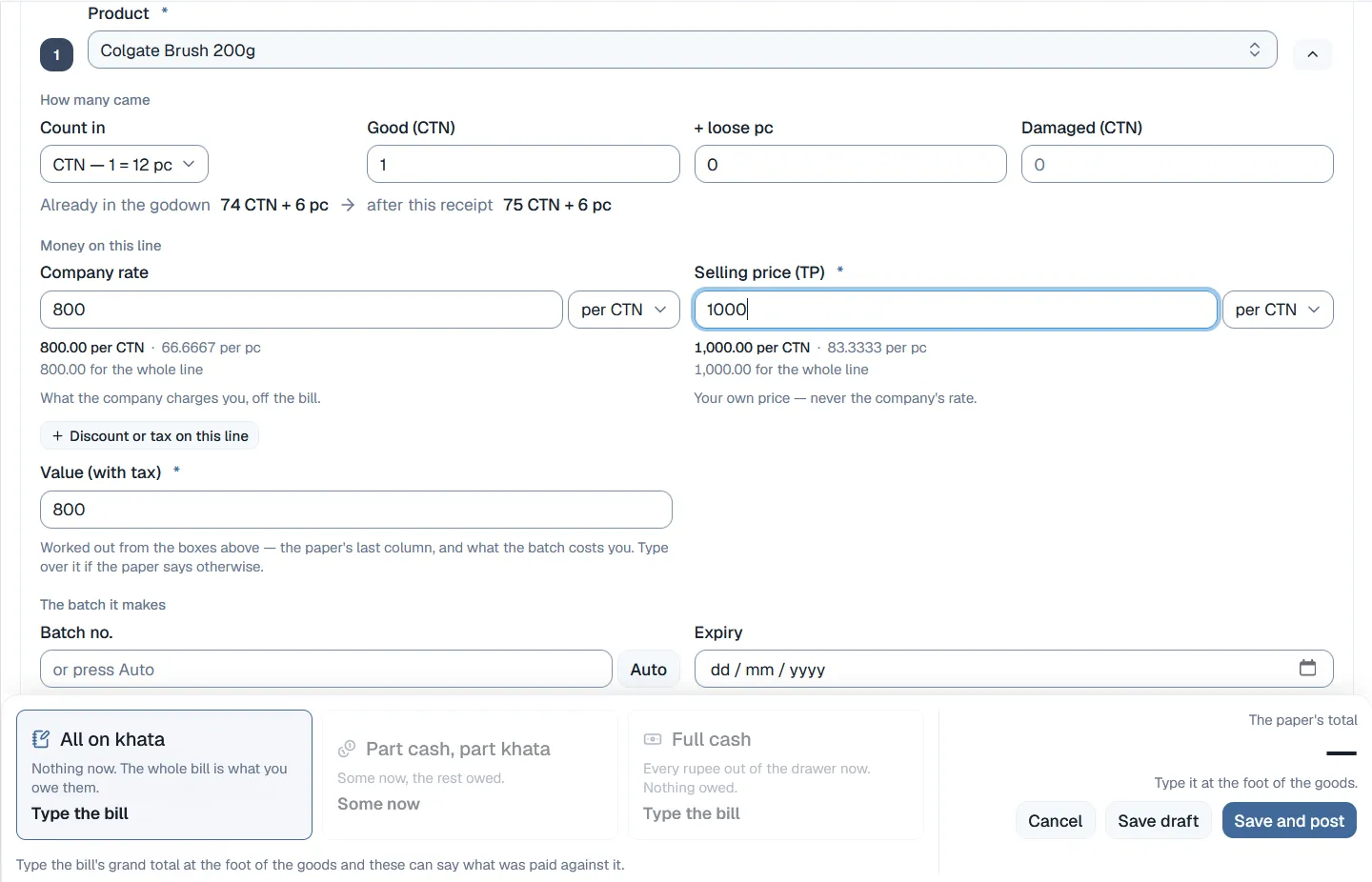
A goods receipt is not a short summary of the company invoice. It is that invoice, typed exactly as it reads. Cartons with the loose pieces on top, the company rate, your own selling price, the tax columns printed on the paper, and the freight. All of it goes into the cost of the batch that line creates.
Purchase returns, company credit notes and money-only corrections all sit under the receipt they belong to. So the company account and the godown never drift apart.
Batches and cost
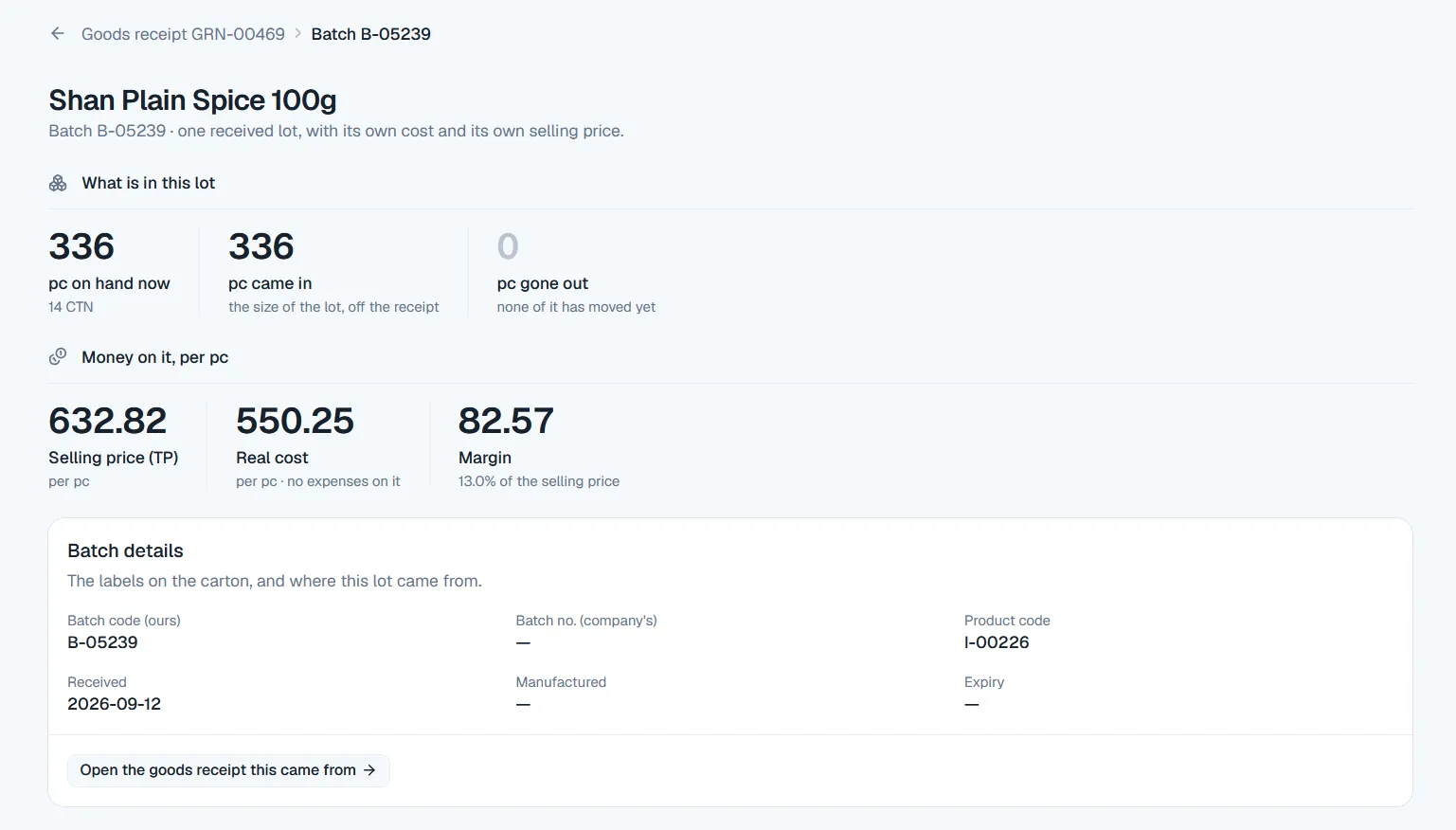
Buy the same product twice and you get two batches. They are never mixed into one average. Each one keeps its own landed cost, its own selling price and its own expiry date, and each is picked, priced, sold and valued on its own. That is how you can finally say what one particular load earned.
Cost and margin are separate permissions. Your counter clerk can make bills all day without ever seeing what a carton cost. Your godown manager can run the store without seeing the margin on it.
Godowns
A distributor does not have one single pile of stock. You have a main store you sell from, and a separate room where damaged, expired and returned goods wait for the company representative to inspect them. Netolyst treats both as real places, and counts the condition of the goods as part of the balance instead of a note beside it.
What you can sell
One calculation decides what is available, and every part of the system uses that same one. Your counter uses it when making a bill. Your order desk uses it when accepting an order from the field. Nothing else in the system is allowed to hold stock.
Reports
The stock screen opens on the numbers you chase every day: all products, in stock, out of stock, low stock, expired and expiring soon. Under that, one row per product — what you can sell now in cartons and pieces, how many batches it is sitting in, and what is close to its date. Click any row and its batches open underneath.
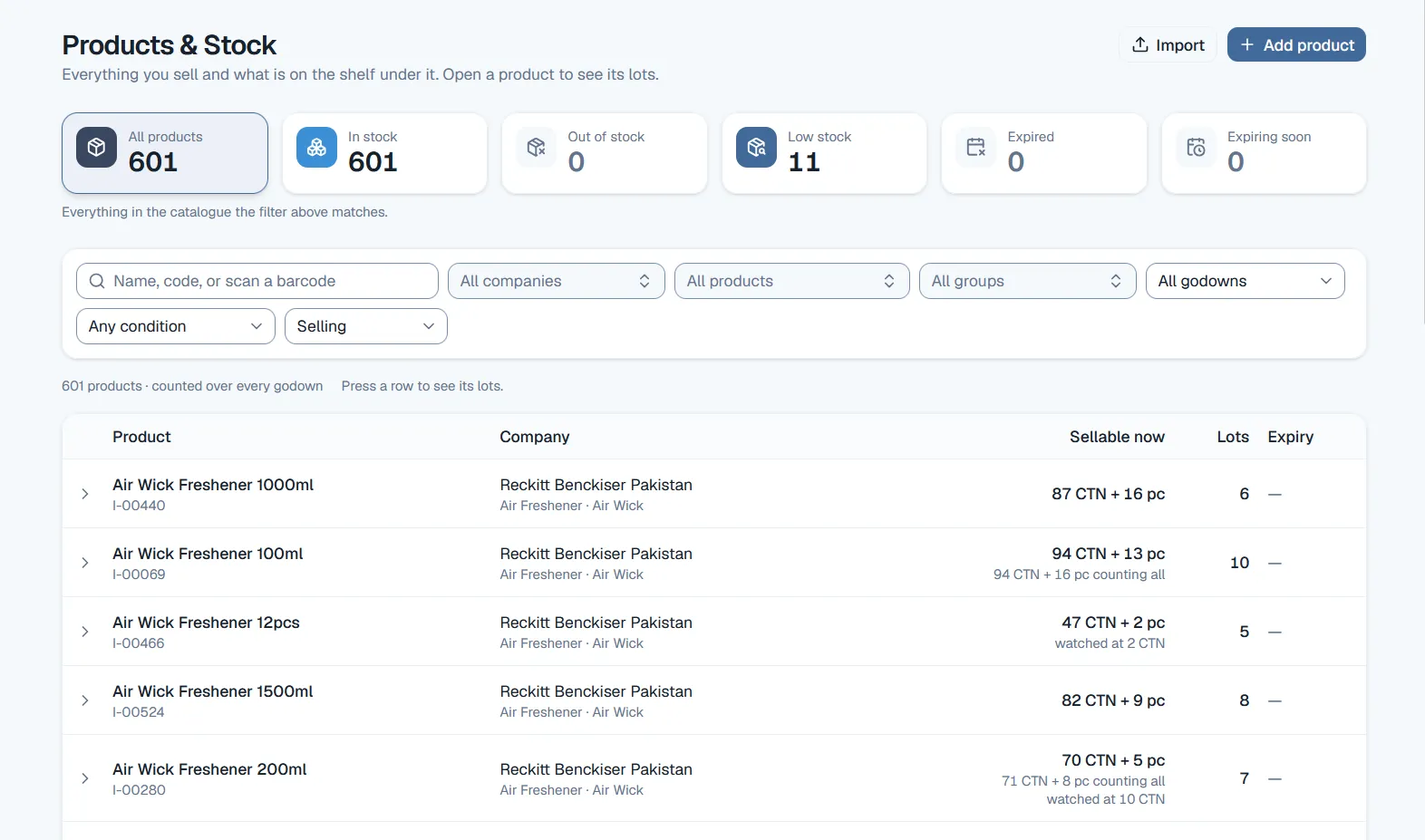
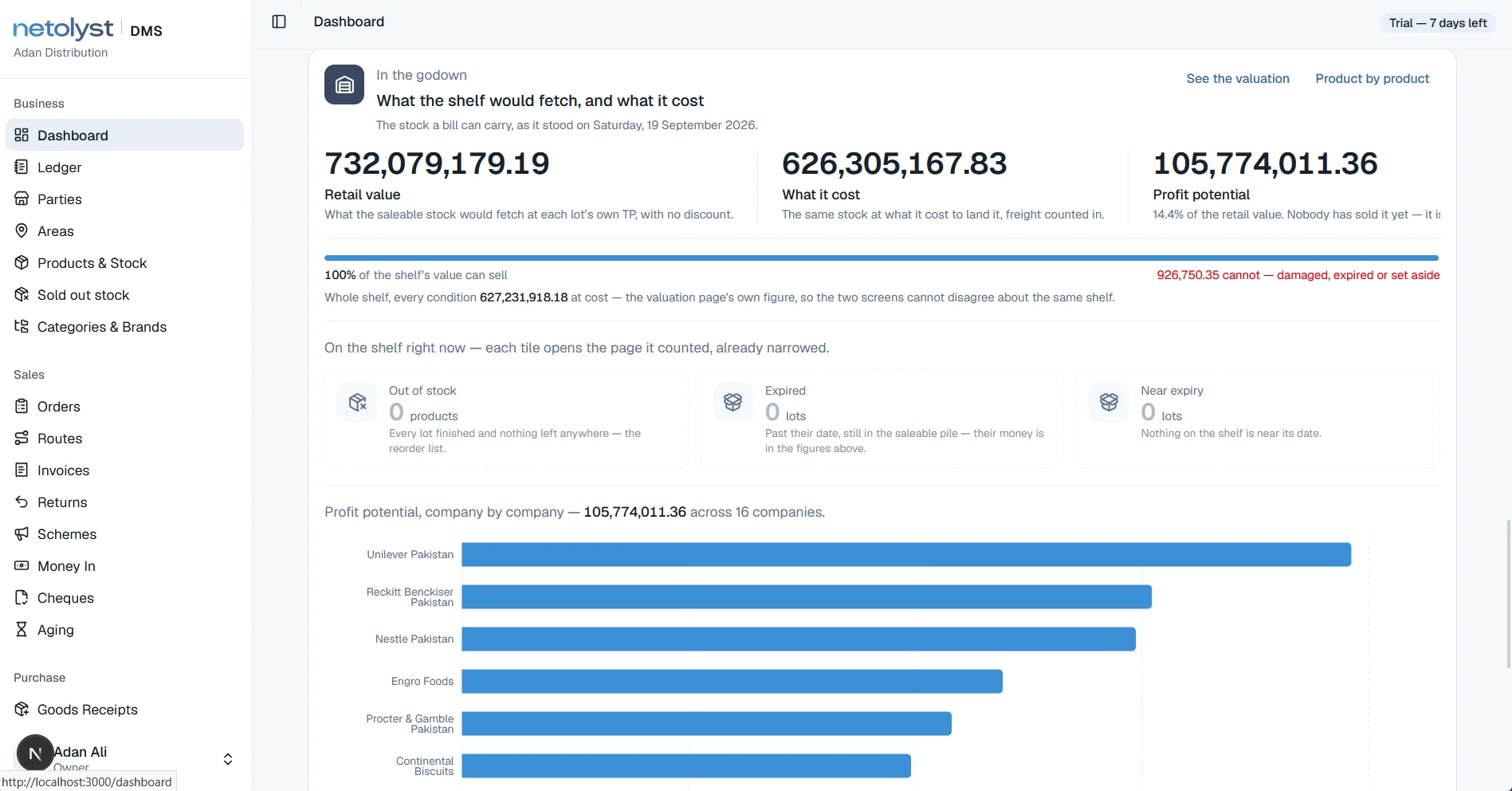
These are screens from the running product, captured on a demonstration business. The company names and figures in them are demonstration data, not a customer’s books.
Connected
Almost every question worth asking about stock is really a question about money. These are the four places the same stock movements are used.
The bill is the only document that takes sellable stock out of your godown, and it takes from the oldest batch first. Voiding a bill puts back exactly what it took. Free scheme goods come off the same stock as the paid cartons.
The goods receipt brings stock in and gives it its cost. Freight lands in the batch, the company account moves with the bill, and purchase returns go against the exact lots the company paper names.
The goods receipt and the bill each write their own accounting entry the moment you save them. Nobody types a stock voucher, and your profit statement reads cost from the same batches the bill sold.
A sales return settles a shop’s bill the same way a payment does, and takes back the free goods those cartons earned. What the market owes you and what is on your shelf are two views of the same trading.
Each of those has a page of its own: the route and the order, the bill that takes the carton off your shelf, the shop khata it debits, and the books it writes into.
Example
A worked example using the documents that really exist in the product. Nothing is typed twice, and every step leaves the record the next step reads.
Forty cartons come off the truck with no invoice yet. You receive them into quarantine: counted, visible on the stock screen, and not sellable until they have a cost.
Quantities, the company rate, your own selling price, the tax columns on the paper, and the bilty and unloading spread across the lines by value. The batch is created with its number and its expiry date.
Each carton cost now includes its share of the freight. So the margin the system shows you is the margin your business actually earns.
He books ten cartons on a phone with no signal. The order holds no stock. It carries an order number, and the stock figure on his screen shows when it was downloaded.
Accepting the order picks the godown and reserves the stock at that moment, using the same check your counter uses.
Six cartons come off an older batch and four off the new one. So the bill carries two lines, with two batch codes, two expiry dates and two rates.
A sales return credits the shop’s khata. An adjustment note moves the two cartons into the damage room, where they stay countable for your claim on the company.
Closing stock at cost and at selling price, what expired, and each company’s opening-received-sold-returned statement all come from the same records these seven steps created.
The carton counted off the truck in step one is the same carton on the bill in step six, and the same rupees on your profit page in step eight. Nobody enters it a second time, so nobody can enter it wrong.
Protection
Software does not stop mistakes by showing a warning. It stops them by making the wrong thing impossible. These six cost a distributor the most money.
There is no screen that edits a balance. A correction has to be a counted difference or an adjustment note, so it always carries a reason, an approver and a date.
The second receipt makes a second batch. Two costs stay two costs, so the margin on a load is the truth about that load instead of an average of your shelf.
Freight and unloading go into the batch at the goods receipt. Your gross profit is calculated against the real landed cost, not the company printed rate.
A posted bill cannot be edited. You void it, which reverses the stock and credits the khata, then make a fresh bill. The original stays on the record.
Counting is blind. The system figure is frozen before counting starts and the difference is shown only afterwards, so the count is evidence instead of agreement.
Every batch carries its expiry date, you set the warning period per product, and expiring stock is counted on the stock screen while there is still time to move it.
Limits
The fastest way to waste your time and ours is a demo that ends on something the product was never built to do. Here are the boundaries, before a conversation instead of after one.
Pricing and the 14-day free trial are the same for every part of the product. They are explained on the Netolyst DMS pricing page.
It is the part of a distributor management system that records what is in your godown and what it is worth. For a distributor that means tracking stock batch by batch instead of one total per product, keeping each batch’s own cost and selling price, watching expiry dates, keeping saleable goods separate from damaged ones, and reducing stock only when a bill is made. It is not warehouse software: there are no racks or pick paths, because a distributor’s godown is a floor-stacked room without them.
No. Inventory is part of Netolyst DMS and is not sold separately. That is a product decision, not a pricing one. The bill is what removes stock, the goods receipt is what gives it a cost, and the accounts read from both. A stock module connected to nothing would make you type the same carton a second time somewhere else, and that is the problem this product exists to remove.
Every line on a goods receipt creates a batch with its own quantity, its own cost, its own selling price and its own expiry date. The same product received twice becomes two batches and they are never mixed into an average. When you make a bill, the oldest batch is used first, and if twenty pieces come off two batches the bill shows two lines with two batch codes and two rates — because that is what the shop is handed. Open any batch and you see what came in, what is left, what it really cost and what it earns per piece.
Yes. Stock is kept per godown as well as per batch, including the real ones a distributor has — the main store you sell from, and the damage room the company representative inspects. Moving goods between them is a document, not an edit. What you can sell right now is counted across every godown, with each godown’s own position visible underneath.
Stock is valued on the real cost of each batch, including the freight and unloading you added at the goods receipt. Not on an average, and not on the company printed rate. The dashboard shows your godown value two ways: what it would fetch at each batch’s own selling price, and what it cost you to land there. The difference is shown company by company, and the out-of-stock, expired and near-expiry counts beside it come off the same stock records your bills move.
The return is a document. It settles the shop’s bill the same way a payment would, the goods come back into stock, and any free goods those cartons had earned under a company scheme are taken back. A return that would leave the shop holding more free goods than it still qualifies for is refused, unless somebody with the scheme permission allows it with a reason on the record. Goods that come back damaged are moved onto an adjustment note into the damage room, where they stay countable for your claim on the company.
Only through a count or an adjustment note, and only with approval. There is no screen that edits a balance. A stock count freezes what the system believes, your staff count the floor without seeing that figure, the difference is shown, and the adjustment posts once somebody with the right permission approves it. The reason and the approver stay attached to it afterwards.
Yes. You enter the expiry date on the batch at the goods receipt, expired stock cannot be sold at all, and you set the warning period on each product yourself — ninety days for medicine, seven for a sack of rice. Expiring stock is counted on the stock screen next to out-of-stock and low-stock, and has its own report. Note that picking still follows oldest received first, not nearest expiry first, which is worth knowing if you are looking at this for pharmaceutical distribution.
Yes. Products come in from a CSV template. Stock itself comes in as normal goods receipts, not as a bulk quantity upload. That takes longer when you start, and it is the reason every lot has a real cost and a real selling price from day one instead of an opening pile nobody can cost. Party balances come in the same way, as the first line of each party’s book.
No. Goods are received by typing the company bill as it reads, and bills are made on a keyboard. There is no scanner and no handheld device support today. If barcode receiving and picking is a requirement for you, this is not the right product yet.
Yes. Company is a separation of the catalogue, not a label on a record. So the same product held under two dealerships is two separate items with two separate stock positions. Stock can sit together in one godown physically while reporting separately, and each company can be handed its own stock and sale statement — opening plus received minus sold minus returned, in cartons and in rupees — built from your stock records instead of assembled by hand.
Only the people you give those two keys to. Cost and margin are separate permissions, and neither comes automatically with a job title. A counter clerk can make bills all day without ever seeing what a carton cost, and a storekeeper can run the godown without seeing the margin on it. Nobody can give somebody a permission they do not hold themselves, and everything anyone changes is written to a log that cannot be edited.
Talk to us
How many products, how many companies and how many godowns you run. Your reply will come from the engineers who built the stock system, not from a sales desk.
Built for a Pakistani distribution house holding one to four dealerships, counting in cartons and pieces and billing in rupees. Not warehouse software, and not built for courier or freight companies.