Your godown
The bill is the only document that takes sellable stock out, and it takes from the oldest load first. Void it and exactly those loads come back, with their own costs still on them.

Part of Netolyst DMS
Your bill is not a print-out of something that already happened. It is the document that takes the goods off your shelf, puts the money on the shop’s khata and writes your accounts. Netolyst DMS makes that bill in one save, with the batch, the rate, the tax and the scheme already correct.
Everything on this page is part of Netolyst DMS — the same system that holds your godown, keeps the shop khata and writes your accounts. There is no billing-only version to buy. A bill in a distribution house is not a document about a sale: it is what takes the carton off your shelf, what the khata is debited by, and what your accounts are written from, all in one save.
If you want to see the whole business and not only the bill, start with the full list of what it does and come back here for the invoicing detail.
What it is
An order can hold stock. Only a bill moves it. One bill does five things at once: it takes the carton off your shelf, puts the money on the shop’s khata, decides the scheme, charges the tax and writes its own accounting entry.
Most billing programs treat the invoice as paperwork. Somebody sells the goods, and afterwards somebody prints a document about it. In a distribution house that gap is where the month goes wrong: the godown says one thing, the khata says another, and the paper in the shop’s hand says a third.
Here the bill is the event itself. Nothing leaves your godown without one, and nothing lands on a shop’s khata without one. Once it is saved, it either all happened or none of it did. There is no half-posted bill for somebody to find later.
This page is about the document itself. Which load the bill takes from, and what that carton cost you, is covered under batch-wise inventory management. The route, the order behind the bill and the company schemes it applies are covered under sales management.
The problem
Most distributors bill on a program that knows quantities and prices and nothing else. The batch, the tax, the scheme and the firm are all carried in somebody’s head. Here is what that costs.
A figure somebody has already acted on quietly becomes a different figure. The shop is holding the old paper, your munshi is reading the new one, and nothing on the record says a change was ever made.
The shop is handed two batch codes and two expiry dates, and the bill shows one merged line. Nobody at either end can check what was actually delivered, and a return three weeks later is an argument.
A clerk does the sales tax on a calculator while a shopkeeper waits. One wrong figure travels into the bill, the khata, the month and the return you file.
A 12+1 that the company letter promised and a carton your counter man gave as a favour print identically. At the end of the month you cannot separate what the company owes you from what you simply gave away.
A registered buyer keeps back part of the sales tax and deposits it himself. Somebody reduces the bill to make the khata agree, and your sales figure shrinks by money that was never a discount.
The house runs two tax entities and one series of numbers. Which firm issued which bill is settled from memory at filing time, and one number can end up on two papers.
One save
You choose the shop and type the quantities. One save does all of this, and it either all happens or none of it does. There is no second screen to remember afterwards.
Stock comes off the godown you billed from, taken from the oldest load first. This is the only document in the system that can do it.
Twenty pieces off two lots print as two lines, each carrying its own batch code, its own expiry date and its own rate.
On the bill’s own date, not the order’s. A scheme that ended yesterday does not appear, and one that started this morning does.
Per line, from the switches on each product and the discount you entered. Your counter does no arithmetic at all.
What the shop will actually hand over, which is not always the bill’s total. Cash taken at the counter is written as a real receipt against the bill.
The bill posts its own double-entry journal as it saves. Nobody types a sales voucher, and nothing waits for a night job.
Your godown, the shop’s khata and your accounts are never brought up to date by hand after a bill. They are brought up to date by the bill. Where those goods came from is covered under the stock ledger, where the money goes is the shop khata, and the entry the bill writes by itself is explained under accounting.
Corrections
There is no draft you can alter and no edit button anywhere. Once a bill is posted it stays as it was posted. When one is wrong, you void it and make a fresh bill, and your record keeps both.
Voiding also releases the money that bill had absorbed from the shop’s payments, and that money spreads again over whatever is still open. How a payment spreads across unpaid bills is explained under the shop khata.
Bill lines
Twenty pieces coming off two lots are two lines on the bill. Each line carries its own batch code, its own expiry date and its own rate. You typed one line; the shop is handed two, because two is what is in the carton.
This is the single biggest difference between a distributor’s bill and a shop’s bill. You are not selling a product. You are selling a particular load of it, at the price that load carries.
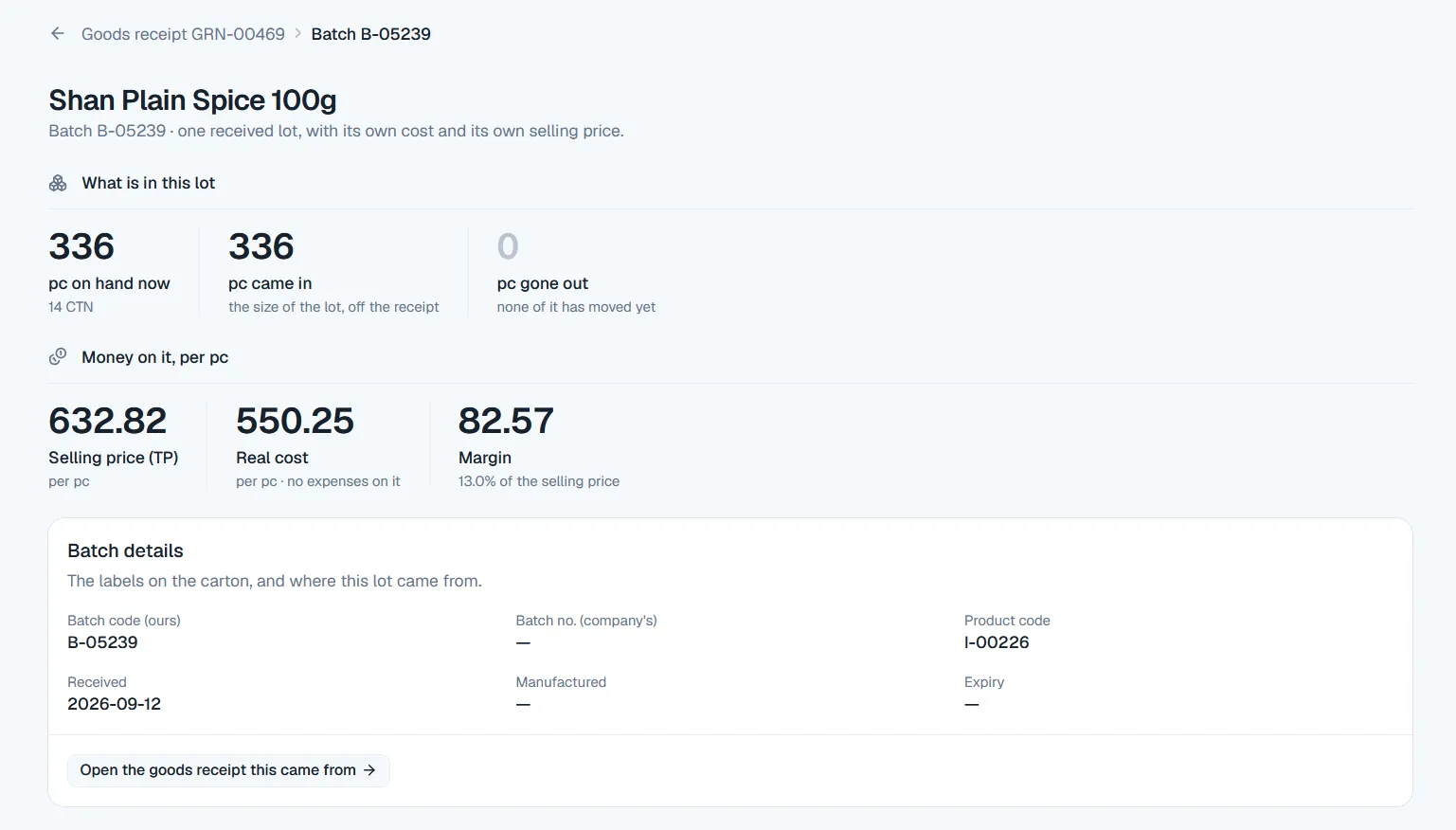
Where a load gets its cost, its price and its expiry date in the first place is covered under batches.
Bill taxes
A bill can charge sales tax, advance tax and further tax, in the order they print. Each one is a switch on the product: on or off, percent or a fixed amount, one value. GST is not a fourth tax. It is the everyday name for sales tax, and there is one levy here rather than two.
| Levy | How you set it | How it charges |
|---|---|---|
| Sales tax | A switch on each product. Percent or a fixed amount, and one value. | A percent is charged on the line after its discount. This is the levy most people in the market call GST. |
| Advance tax | A switch on each product. Percent or a fixed amount, and one value. | Charged and printed after sales tax, in its own column, so your buyer reads the bill in the order he expects. |
| Further tax | A switch on each product. Percent or a fixed amount, and one value. | Charged and printed last. Switch it off on the products it does not apply to and it never appears. |
payable amount = grand total − sales tax withheld
Where a registered buyer keeps back part of the sales tax and deposits it himself, that is his decision about paying, not a levy on your bill. So it never moves the grand total. The payable amount is what his khata is debited, and on every bill nobody withheld on, the two figures are the same number. The khata itself, and how it is settled, is covered under customer ledger.
Price warnings
A price is your business, not the software’s. So neither warning blocks the bill. Both of them judge what the shop actually pays, which means a discount cannot be used to slip a line under them.
| Warning | When it fires | Who sees it |
|---|---|---|
| Below the batch’s trade price | The line is priced under the selling price that particular load carries. | Everybody at the counter, in red. Nobody sets a rate below yours by accident. |
| Below what the carton cost you | The line is priced under the real cost of that load, with bilty and labour already inside it. | Only staff who hold the cost permission. Your counter clerk bills all day without ever seeing a cost. |
Landed cost is what a carton really cost you after bilty and labour. It is worked out when the goods arrive, which is covered under receiving stock.
Discounts on the bill
Rupees you give off never go into the rate. They sit in their own column beside the gross amount, so the bill prints a real price and a real discount. At the end of the month you can still tell what you discounted from what you sold cheap.
This section is about how a discount appears on the document. Where a discount may be given, who may ask for one from the field, and what your office does with that request are covered under discounts on the sales page.
Free goods
A 12+1 is written on the bill honestly: a line with a quantity, a price of zero, marked free. No tax on it and no price warning against it. And one column says who promised it.
Entering a company’s scheme letter once, the dates that switch it on and off, and the report that counts what each scheme gave are covered under company schemes.
Firms
One distribution house commonly runs two or three firms. Each is its own tax entity, with its own NTN and STRN, its own bank accounts and its own invoice letters. They report together and file separately, and the bill knows which one it came from.
Printing
Nothing to install on each machine and nothing to set up per counter. The bill opens as an A4 page and your browser turns it into a PDF you can send on WhatsApp or keep.
Khata statements, goods receipts, the credit list and the whole report pack print the same way. They are listed on the full list of what Netolyst DMS does.
Cash at the counter
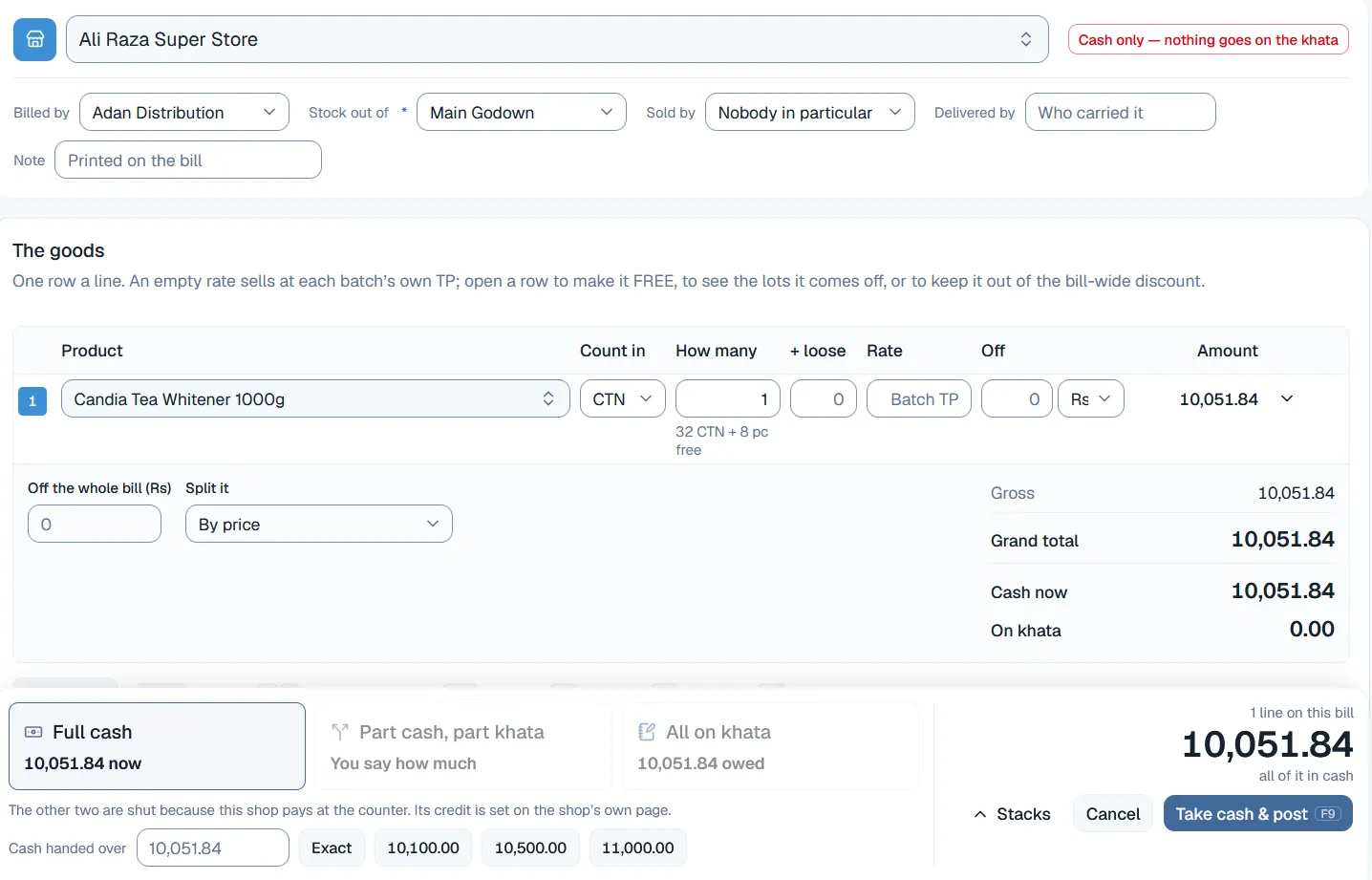
A bill can record that money was taken when it was entered, in part or in full, instead of leaving every rupee to be chased later. What is written is a real receipt against that bill, not a note beside it.
The bottom of the bill shows what was handed over and what the shop still owes. That is the figure your salesman sees on his phone the next time he stands at that door.
Receipts taken later, advances, cheques, credit limits and how one round payment spreads over unpaid bills are the shop khata, covered under customer ledger. This screen is from the running product, captured on a demonstration business, so the figures and names in it are demonstration data.
Who sold it
The person who types a bill is very often not the person whose sale it is. So the bill records both, and it records them in the way that makes them useful afterwards.
FBR e-invoicing
This is the first thing a serious Pakistani buyer asks, so here is the plain answer before you spend an hour on a demonstration.
There is no live FBR link in this software today. No IRN, no QR code on the bill, and no date we are willing to commit to. No integrator has been chosen either.
What exists is one setting on each product, recording which products the link will apply to on the day it is built. That setting does nothing else. Nothing is transmitted anywhere, and no number comes back.
In the meantime your bill charges and prints tax on our own invoice, at the values you set on your products. Nobody should buy this today expecting e-invoicing to be live by a particular date.
Connected
A bill in a distribution house is never only a piece of paper. The same document moves your godown, moves the shop’s balance and writes your accounts, at the moment you save it. These are the four places it lands.
The bill is the only document that takes sellable stock out, and it takes from the oldest load first. Void it and exactly those loads come back, with their own costs still on them.
The khata is debited what the shop will actually hand over, which is not always the bill’s total. Cash taken at the counter is written as a receipt against that same bill.
The bill posts its own double-entry journal in the same save. Nobody types a sales voucher, and your profit takes its cost from the very batches the bill sold.
The free line on the bill is decided by the scheme letter’s own dates. When a shop returns those cartons, the free goods are taken back, so you never claim one that came home.
Each of those four has its own page: inventory management, the customer ledger, accounting and company schemes.
Protection
Software does not stop mistakes by showing a warning. It stops them by making the wrong thing impossible. These eight are built into how a bill works here.
A posted bill cannot be edited by anybody. The correction is a void with a reason and a fresh bill, and both of them stay on your record for good.
The bill is the only document that takes sellable stock out. There is no other screen anywhere that can quietly remove a carton.
One typed line becomes one printed line per batch, each with its own code, expiry date and rate. A merged line is not something the system can produce.
Your counter types quantities. Price, tax, scheme and discount are all calculated for you, so there is no arithmetic left at the counter to get wrong.
No statutory rate exists anywhere in this code. You set what each product carries, so the day a rate changes you change it, and nothing old is quietly believed.
A fixed amount is charged once per product per bill. Rs 5,000 fixed on ten pieces is Rs 5,000, not Rs 50,000.
Sales tax a registered buyer keeps back comes off what he pays, never off the bill. Your grand total and your tax total do not move.
Letters are unique across your firms, and letters a posted bill already carries are reserved for good. The same number can never be out in the market twice.
Limits
Here is what a bill in this software does not do. Better that you find out now than in the middle of a demonstration.
Pricing and the 14-day free trial are the same for every part of the product. They are explained on the Netolyst DMS pricing page.
Terms
These are the trade words used above, in the meaning the bill gives them.
It is the part of a distributor management system that makes the bill. For a distributor that bill is not paperwork about a sale. It is the document that takes the goods off your shelf, puts the money on the shop’s khata and writes your accounting entry, all in one save. It bills batch by batch with each load’s own rate and expiry, charges the taxes your products carry, applies the company scheme and prints on your own firm’s letterhead.
No, and that is deliberate. You void it with a reason, which puts the goods back into the exact batches they came from and credits the shop’s khata, then you make a fresh bill that is prefilled from the old one. The original stays on your record. The alternative is a document that changed after somebody already acted on it, which is how a shop and a godown end up disagreeing.
Because the pieces came off two loads, and those two loads have different batch codes, different expiry dates and often different rates. Printing them as one line would be printing something that is not in the carton. Your total does not change: your clerk sees the same amount whether the twenty pieces came off one lot or three.
Yes. A firm here is a tax entity inside one business, with its own NTN and STRN, its own bank accounts, its own invoice letters and its own number series. One house commonly runs two or three, reporting together and filing separately. Each firm’s bills print with that firm’s own logo, and the firm details on a posted bill do not change later.
No, and that is on purpose. No statutory rate exists anywhere in the code. Each product carries its own switches for sales tax, advance tax and further tax, on or off, percent or a fixed amount, and you set the values. A rate baked into a program goes out of date with the next Finance Act and gets believed anyway, so the software does not pretend to know one.
No. GST is the everyday name in this market for sales tax. There is one levy, not two, so nothing can be charged twice by accident. The other two levies on the bill are advance tax and further tax, and each of those is its own switch on each product.
As what it is. He is keeping back part of the sales tax and depositing it himself under his own name, which is a decision about paying, not a levy on your bill. So your grand total and your tax total do not move. The payable amount is the grand total less the tax he withheld, and that is the figure his khata is debited. On a bill where nobody withheld anything, the two figures are the same number.
Not yet. There is no live connection, no IRN and no QR code on the invoice. What exists today is a setting on each product that records which products it will apply to when the link is built, and nothing more. No date is committed and no integrator is chosen. Tax is charged and printed on our own invoice in the meantime.
The system warns and shows it in red, but it does not block, because a price is a commercial decision and a block is something people learn to route around. The warning judges what the shop actually pays, so a discount cannot be used to hide a line under it. There is a second, quieter warning when a line goes below what that carton really cost you.
Only if you give him that key. Cost and margin sit behind their own permissions, separate from the ability to make a bill. The below-cost warning is visible only to staff who hold the cost permission, while the below-trade-price warning is visible to everybody at the counter.
In its own column beside the gross amount, never folded into the rate. You can type it as rupees or as a percent on a line, and the rupees are worked out for you. A discount on the whole bill is spread over the lines you tick, by value or equally, and added to each line’s own discount. Tax is then charged on the gross less the discount, on every line, on every bill.
Yes, and that is the point of writing them as separate lines. A scheme line came from a company’s letter and is something you can claim. A hand free line was given as a favour and nobody promised it. One column on the bill says which is which, so at the end of the month the giveaway you cannot claim back has a number instead of a feeling.
Bills open as an A4 page that your browser turns into a PDF, so there is nothing to install on each counter machine. That PDF is a normal file you can send however you like. Each firm’s own logo travels with its bills, and a sales return prints as its own note rather than as a changed bill.
No. Invoicing is part of Netolyst DMS and is not sold separately, and that is a product decision rather than a pricing one. The bill is what removes your stock, the khata is what the bill debits, and the accounting entry is written in the same save. A billing program connected to nothing would make you type the same carton again somewhere else, which is the problem this product exists to remove.
Talk to us
Tell us what is on it. How many lines, which taxes your products carry, whether you bill from one firm or three, and what your counter still works out by hand today. Your reply will come from the engineers who built the billing screen, not from a sales desk.
Built for a Pakistani distribution house billing in rupees, holding one to four dealerships. FBR e-invoicing is not connected, and bills are made at your office rather than on a van.