Part of Netolyst DMS

Sales management software for distributors

You do not sell over a counter. You sell by sending people out. Netolyst DMS runs that whole path: your salesman’s route, the order he takes at the shop with no internet, your office approving it, the company scheme on the bill, and the credit rule that decides whether that shop should be sold to at all.

+92 336 0861999

A FULL DAY, NO INTERNETTHE ROUNDSENDWHEN SIGNAL RETURNSoldest firstTHE OFFICENONE LOSTNONE DOUBLED
A morning of orders taken offline, reaching your office one by one.

Sales comes with Netolyst DMS. It is not sold separately.

Everything on this page is part of Netolyst DMS — the same system that holds your godown, keeps the shop khata and writes your accounts. There is no sales-only version and no separate order-booking app to buy. A sale is not a separate event in a distribution house: the bill takes the carton off your shelf, the khata is what that bill debits, and your accounts are written at the same moment.

If you want to see the whole business and not only the selling side, start with the full list of what it does and come back here for the sales detail.

What it is

What is sales management for a distributor?

It means moving goods you bought from two or three companies into hundreds of small shops — on credit, through salesmen who walk a fixed route — and having the order, the bill, your stock and the shop’s balance all still agree at the end of the month.

Most software that says "sales management" means a list of deals: leads, stages, a forecast, a closing date. A distributor has none of that. You sell to the same shops, from the same catalogue, on the same route, every week. What matters is whether the order taken at the shop door reaches the bill without being written a second time.

That work has five parts, and in most distribution houses they sit in five different places. The route: which shops, in what order, on which days, and which salesman. The order: taken at the shop, usually with no internet. Your office answer: is there stock, from which godown, at what price, and is this shop’s credit clear. The scheme: the company letter says twelve cartons earn one free, and somebody has to stop applying it the day the letter expires. And the credit: what the shop already owes, how old it is, and whether more goods should go out on top of it.

Netolyst DMS handles all five. What that bill then does to your godown — which batch it takes from, and what that carton cost you — is covered under inventory management.

This is not a CRM
There are no leads, no deals, no stages and no forecast. Your customer is a shop that already buys from you. The question is not whether it will buy, but what it ordered this morning and what it still owes.
This is not shop billing software
A shop till sells one piece at one fixed price to whoever is standing there. You sell cartons and pieces at a price set on the batch, to a named shop with a running khata, mostly on credit, with company schemes on top.
This is not a company’s salesman-tracking app
Most field apps are bought by a manufacturer who wants to watch its distributors. This one is bought by you. The route, the order, the bill, the khata and the accounts are all yours.

The problem

What goes wrong when you manage sales by hand.

Most distributors run the selling side on a salesman’s diary, a phone call to the office, and a billing program that knows quantities but not routes, schemes or credit. Here is what goes wrong, and why it happens.

  1. The same order is written three times

    Once in the salesman’s diary at the shop, once on the phone to the office, once into the bill. Two of those three are copying. Copying is where a carton becomes a piece, and one shop becomes the shop next door.

  2. Your office answers from memory

    An order is promised before anybody has checked the godown, because checking means walking there. By the time the bill is made the goods are gone, and the shop was told something different.

  3. The scheme letter sits in a drawer

    A 12+1 is applied because somebody at the counter remembers it. He also remembers it three weeks after the letter expired, and forgets it for a shop that qualified. Neither mistake shows up until the company refuses your claim.

  4. Discounts disappear into the rate

    Rupees come off at the counter and get mixed into the price. The bill then shows a rate that was never anybody’s rate. At the end of the month you cannot separate what you discounted from what you simply sold cheap.

  5. Credit runs on memory

    No limit, no agreed number of days, no due date. "Overdue" means whatever your munshi remembers about that shop, and the decision to sell again is made by whoever is standing at the counter.

  6. Returns are never matched to the bill

    Returned cartons are noted against the shop instead of against the bill they came from, and the free goods those cartons earned stay claimed from the company. Your sales figure, your stock figure and your claim all end up wrong.

How it works

How one order becomes a bill and money in your drawer.

These are the real steps in the product, in the order it does them. Between step two and step six, nobody types anything a second time.

  1. 01

    You build the route

    Pick the shops, drag them into walking order, choose the salesman and choose which days of the week the route is walked.

    Sales manager Web app

  2. 02

    Your salesman takes orders with no internet

    His phone already holds his route, his shops, their balances, the catalogue and the running schemes from its last download. He takes the morning’s orders offline, and records a reason where a shop did not order.

    Order booker Android app, offline

  3. 03

    He presses Send

    The morning’s orders go up one by one, oldest first. Nothing leaves the phone before he presses Send, and nothing is lost or duplicated if the signal drops halfway.

    Order booker Android app to your office

  4. 04

    Your office accepts or rejects each order

    Accepting picks the godown and holds the stock at that moment. Rejecting needs a reason, which your salesman reads on his phone.

    Order desk Web app

  5. 05

    The bill is made in one click

    Stock is taken from the oldest batch first, the scheme is applied again on the bill’s own date, and taxes and discounts are calculated for you. Each batch becomes its own line at its own rate, because that is what the shop is handed.

    Counter clerk Web app

  6. 06

    The shop’s khata and your cash both update

    The khata is debited what the shop will actually pay, which is not always the bill total. Cash goes into a named drawer or a bank account.

    Cashier Web app

The carton your salesman wrote at the shop door in step two is the same carton on the bill in step five, and the same rupees on the shop’s khata in step six. Nobody enters it again, so nobody can enter it wrong — and your godown moves only once, in step five.

Routes

Plan every salesman’s route.

A route here is one salesman’s round: his shops in walking order, his name on it, and the days of the week he walks it. Everything else follows from that.

Order booking

Take orders with no internet.

Your salesman carries a real Android app, not a website. It keeps its own data on his phone and works completely offline. After a download it holds his routes and shops, each shop’s balance and last purchase, the catalogue with an indicative rate and a stock signal, and the schemes running now. When signal comes back, he presses Send.

The three guarantees the field app gives, and what makes each one true. Tested on real Android phones: sign in, aeroplane mode, take ten orders, force-close the app, reopen, restore signal, and confirm the office received exactly ten.
What you getHow it is guaranteed
No order is ever lostEvery order is saved on the phone the moment it is taken. It survives the app being closed and the phone being switched off and on.
No order arrives twiceEach order carries its own code, and the server checks that code before writing. If the signal drops during sending and he tries again, you get one order, not two.
Nothing is sent by accidentThere is no automatic upload. Only your salesman pressing Send ever sends anything, so a half-finished order cannot reach your office on its own.

Order approval

Approve or reject every order from your office.

An order from the field arrives as a request. It holds no stock, names no godown and carries no price. It does carry an order number the moment it arrives, so your office can quote it back to the salesman the same minute. This is deliberate: a phone that has been offline for hours cannot honestly reserve a carton, and a promise you cannot keep is worse than no promise.

what you can sell = stock on hand − stock already held by orders

One calculation, used everywhere something is promised to somebody: your counter when making a bill, and your order desk when accepting from the field. Nothing else in the system can hold stock.

Billing

Make a bill in seconds, with everything already correct.

Choose the shop and the bill arranges itself around it. Stock is taken from the oldest batch first, the company scheme is applied again on the bill’s own date, and taxes and discounts are calculated for you instead of typed at the counter. The bill is also the only document that takes stock out of your godown.

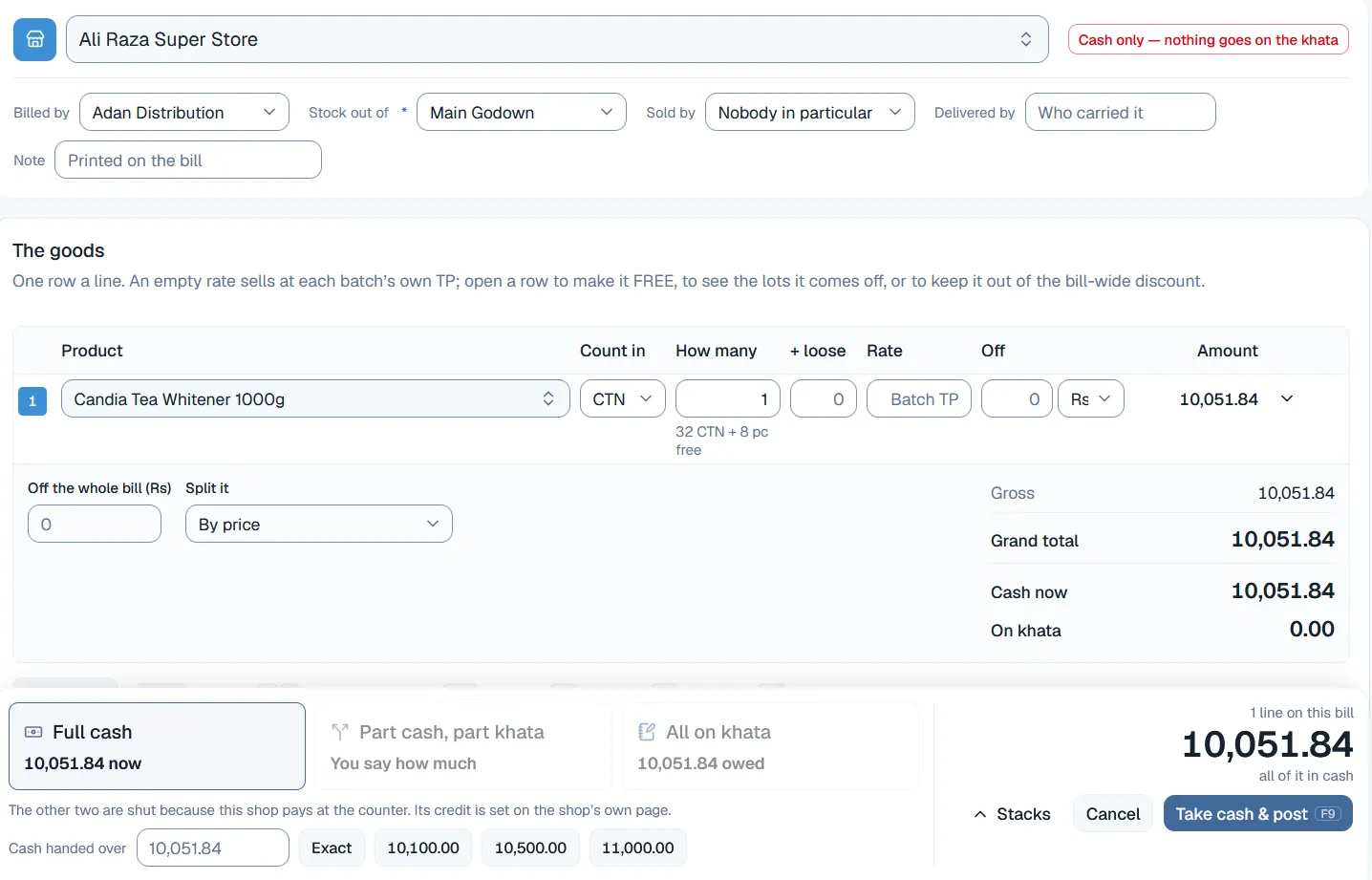
  • The shop’s own rules arrive with the shopA shop marked cash-only closes the credit options at the bottom of the bill. Not because your clerk decided it, but because that shop’s own page says so.
  • Two batches become two linesIf twenty pieces come off two lots, the bill shows two lines with their own batch codes, expiry dates and rates — because that is exactly what the shop receives.
  • A warning if the price is too lowYou get a warning when a line goes below that batch’s selling price. There is a second, quieter warning against cost, and only staff with the cost permission ever see it.
  • Every bill records what was actually paidFull cash, part cash and part khata, or everything on khata. The bottom of the bill shows what was handed over at the counter and what the shop still owes.
  • A posted bill can never be editedTo correct one you void it and make a fresh bill. The void puts back exactly the batches the original took and credits the khata, and the original stays on the record. This removes a whole class of argument.
  • Bill from more than one firmOne business can hold several firms with their own NTN, their own letterhead, their own bill numbers and their own bank accounts. They report together and file separately, and bills print on A4 with each firm’s own logo.

Every bill can also record which salesman it belongs to, which is often not the person who typed it. It is optional, and it is stored as a user rather than a typed name — so "what did Ali sell this month" is a filter, not a search.

The invoice screen in Netolyst DMS used for sales management: a shop selected at the top with a “cash only — nothing goes on the khata” flag, one product line counted in cartons with free pieces shown beside it, and a footer offering full cash, part cash part khata, or all on khata, with the two credit options disabled.
The counter · one bill, with the shop’s own rules already applied

Company schemes

Enter the company letter once. The bill applies it by itself.

A scheme is one product, a type — free goods or a percentage — an optional limit, the company’s share of the cost, a start date, an end date, and who it is for. The dates control it. There is no button to switch on and no button to forget to switch off.

The schemes report shows one row per scheme for any period, counting what was given on posted bills minus what came back on returns. So you never claim a carton from a company that the shop has already returned. Under the schemes sits a "no scheme" row per company holding the free goods nobody promised. Note that the claim document you file with a company is not built yet — this report is the raw material for it.

Discounts

Give discounts without losing track of them.

There is no permission lock on discounts, on purpose — locking one door and leaving another open only sends the money through the other door. Instead, the system keeps every discount visible as a discount, in its own column, instead of hiding it inside a rate that nobody can separate later.

Where you can give a discount in Netolyst DMS, and what stays on the record after the bill is posted.
WhereWhat it isWhat stays on the record
On an orderA requested discount — a percentage, not rupees, because the quantity may still change between the shop and the van. From your salesman’s phone it can only be a percentage, up to a limit you set.The request only. Nothing is charged by it, and your office answers it.
On a bill lineA line discount — rupees off one line, shown in its own column next to the gross amount, never mixed into the price. Enter it as rupees or as a percentage, and the system works it out.The rupees.
On the whole billA bill discount — one amount off the whole sale, spread automatically over the lines you tick, either by value or equally, and added to each line’s own discount.Nothing as itself. After the bill is posted, nobody can say which rupees came from this box.

One rule covers all three: the shop pays the gross amount minus the discount, and tax is charged on what is left. A free line never gets a bill discount. A sales return gives a line discount back in proportion to the quantity returned. And price warnings check what the shop actually pays, so a discount cannot slip a bill under them.

Credit control

Control who buys on credit, and who is overdue.

Every shop starts as cash only. Credit is something you grant, through its own permission, with a reason. For each shop you set a credit limit, a number of credit days, and a limit on how many bills can stay unpaid at once. Who can override those is a separate permission from who can sell.

Collecting the money is the other half of this: payments taken as one round figure and spread over the unpaid bills, cheques followed from received to cleared, advances and write-offs. That is the shop khata, and it is explained in the full list of what Netolyst DMS does.

Sales returns

Handle returned goods properly.

A sales return is its own document, made against one posted bill, and limited per line to what was delivered minus what has already come back. It is not the same as cancelling a bill: you void a bill when the goods never went, and you make a return when the goods went and came back.

Reports

See what sold, what came back, and what is still owed.

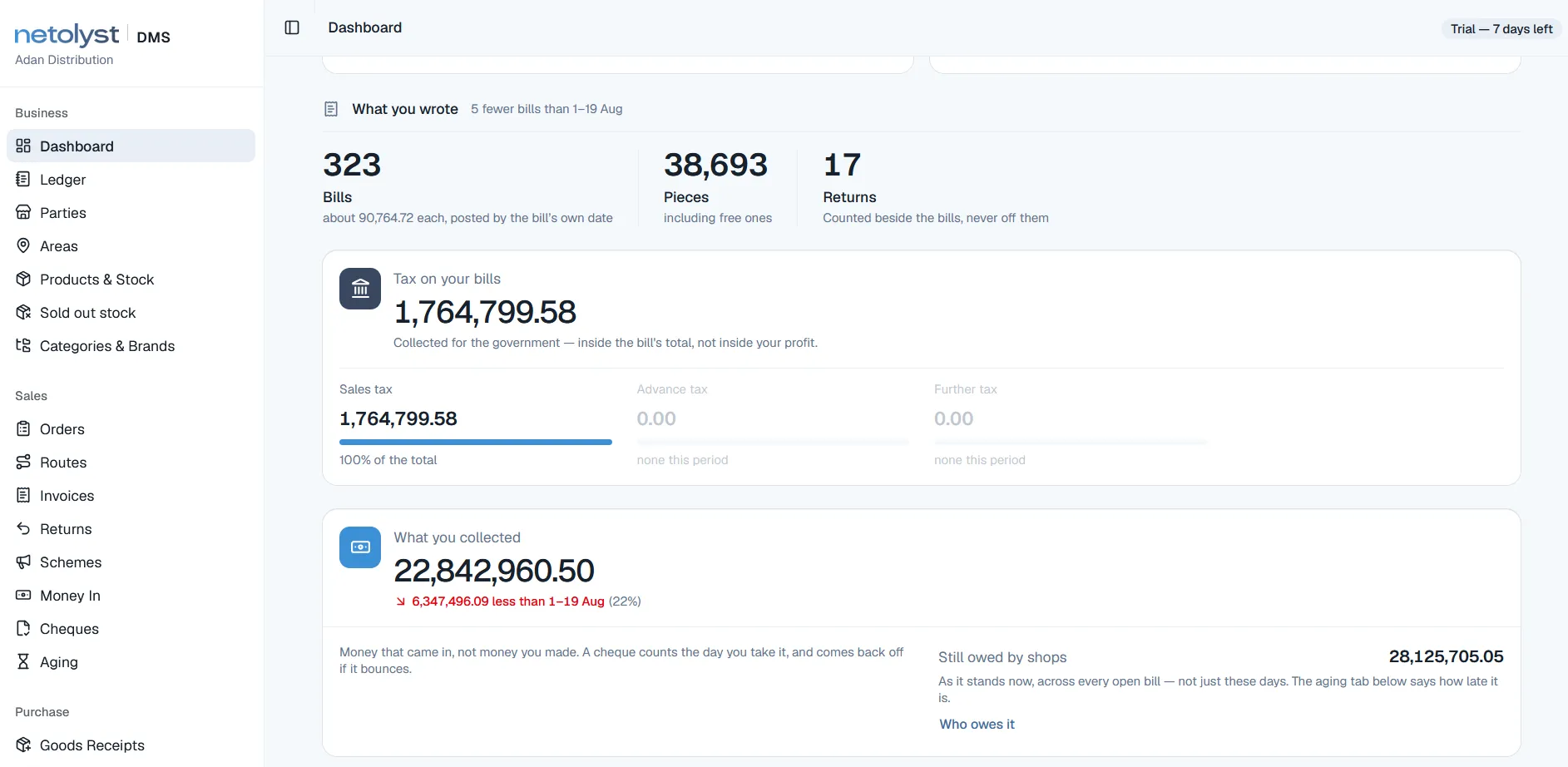
You open one page instead of running a report and choosing a date range first. It opens on the month. Bills, pieces and returns are counted separately instead of mixed together. The tax on those bills is kept out of profit, because it was never your money. And what the market owes you is shown across every unpaid bill, not just this month’s.

The Netolyst DMS dashboard showing sales for the month: bill, piece and return counts kept apart, tax split by levy, money collected, and the total still owed by shops across every open bill.
Dashboard · what you billed, and what is still owed to you
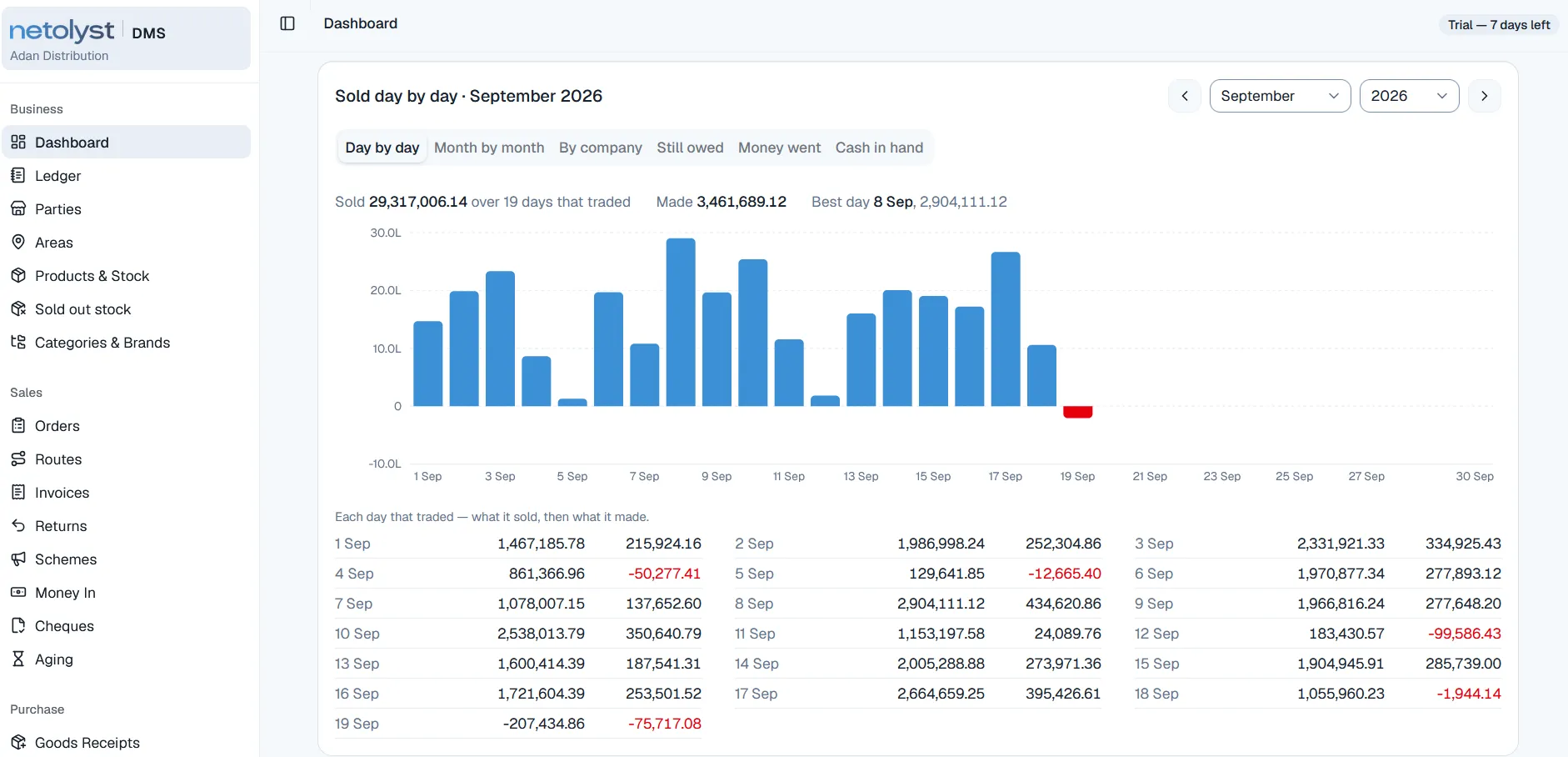
The Netolyst DMS dashboard showing a bar chart of sales for each day of the month beside a table of what each trading day sold and what it made, with losing days shown in red.
Dashboard · every trading day, including the bad ones

These are screens from the running product, captured on a demonstration business. The figures and company names in them are demonstration data, not a customer’s books.

Connected

Your sales are connected to the rest of your business.

A sale in a distribution house is never only a sale. The same bill moves your stock, moves the shop’s balance, and writes its own accounting entry — all at the moment you save it. These are the four places that sale is used.

Stock

The bill is the only document that takes sellable stock out of your godown, and it takes from the oldest batch first. Voiding a bill puts back exactly what it took. Free scheme goods come off the same stock as the paid cartons, so nothing leaves uncounted.

Customers and credit

The khata is debited what the shop will actually pay, which is not always the bill total. Payments are taken as one round figure and spread over the unpaid bills oldest first, and returned goods settle a bill the same way money does.

Accounting

Every bill, payment and return writes its own accounting entry the moment you save it. Nobody types a sales voucher, and your profit statement takes its cost from the same batches the bill sold.

Purchasing

What a sale earned is only knowable because the goods receipt gave that batch a real cost with freight inside it. Your margin on a bill line is measured against that cost, not against the company printed rate.

Each of those four has a page of its own: batch-wise inventory management, the shop khata and credit control, the books, and the bill itself.

Protection

Six sales mistakes the system will not let you make.

Software does not stop mistakes by showing a warning. It stops them by making the wrong thing impossible. These six are built into how the product works.

Stock leaving without a bill

The bill is the only document that takes stock out of your godown. There is no other screen anywhere that can quietly remove a carton.

A phone promising stock it cannot see

A field order holds nothing. Your office takes the hold when it accepts, against a real godown, so the same cartons can never be promised twice from two places.

A half-finished order reaching your office

There is no automatic upload and no background syncing. Nothing leaves your salesman’s phone until he presses Send.

An expired scheme still being applied

The dates control the scheme, so it stops on its own. And once a posted bill has used a scheme, changing the terms creates a new scheme instead of rewriting old bills.

Free goods given away but never taken off stock

A free carton comes off the same batch as the paid ones. It can never be handed over and still counted as sitting on your shelf.

A recovery list that is a day out of date

Overdue and aging are calculated the moment you open them. There is no night job that can fail, and a paid bill is never shown as overdue however old it is.

Limits

What this software does not do.

The fastest way to waste your time and ours is a demo that ends on something the product was never built to do. Here are the boundaries, before a conversation instead of after one.

Pricing and the 14-day free trial are the same for every part of the product. They are explained on the Netolyst DMS pricing page.

Terms

Words used on this page.

These are the trade words used above, in the meaning the product gives them.

Secondary sale
A sale from you to a retail shop. This is what the system records. A primary sale is the one the company made to you.
Principal / company
The manufacturer whose dealership you hold. Your catalogue is separated by it, so three dealerships report separately.
Order booker / salesman
The person who walks a fixed route and takes orders at the shop door. He carries no stock and collects no money.
Route
One salesman’s round: his shops in walking order, his name on it, and the days of the week he walks it.
Stop
A shop’s place on a route. One shop appears once per route.
Visit
One shop on one day: either an order, or a recorded reason there was none.
Request / booking
An order from the field waiting for your office to answer. It holds no stock and carries no price, but it does have an order number.
Scheme
A company’s trade offer, entered once from its letter and applied by the bill itself.
Clawback
The free goods a sales return takes back, because the returned cartons no longer earn them.
Khata
A shop’s running account, kept the way your paper register keeps it: one row after another, each showing the balance after it.
Oldest stock first (FIFO)
Selling the lot you received first, before the newer ones. This is normal Pakistani trade practice.
Trade price (TP)
The price you sell a carton or a piece at. It is set on the batch, not on the product, so two loads can carry two prices.

Frequently asked

Common questions about sales.

Ask us your own question
What is sales management software for a distribution business?

It is the part of a distributor management system that runs your selling: planning salesman routes, taking orders at the shop door on a phone, approving those orders at your office against real stock, making bills that apply company schemes by themselves, and controlling credit before the goods leave. It is not a CRM. There are no leads, no deal stages and no forecast, because your customer is a shop that already buys from you.

Can my salesman take orders where there is no internet?

Yes. That is what the Android app is for. It holds his route, his shops and their balances, the catalogue and the running schemes from its last download, and takes orders completely offline. The orders stay on the phone until he presses Send. No order is lost if the app is closed or the phone restarts, and no order arrives twice if the signal drops while sending.

Does the salesman’s phone reserve the stock?

No, and that is deliberate. A phone that has been offline for hours cannot know what is on your shelf. So a field order carries no godown, no price and no stock hold. It carries an order number the moment it arrives, so your office can quote it back the same minute, and the stock is held at your office when it accepts, against a real godown.

Can my salesman fix an order he got wrong?

Yes, as long as your office has not answered it. He can replace the whole order or cancel it. Once you accept or reject it, both options close and his screen tells him so — then he rings your office. A rejection always carries a reason, which he reads on his phone.

How are company schemes like 12+1 handled on the bill?

You enter the company letter once: one product, free goods or a percentage, an optional limit, the company’s share of the cost, a start date, an end date and who it is for. The dates control it, so there is no button to switch on and none to forget to switch off. The bill then applies the scheme by itself, and the free carton comes from the same batch the paid cartons came from. Your counter man can remove a scheme line with a reason, but never change its quantity, and if stock is short the free line is trimmed and the bill still goes through.

What happens when a shop returns cartons that came with free goods?

The return takes the free goods back, because those cartons no longer earn them. If the return would leave the shop holding more free goods than it still qualifies for, it is refused — unless somebody with the scheme permission allows it, with a reason on the record. Your schemes report already counts returns, so you never claim a carton from the company that came back to you. A percentage scheme has nothing to take back.

Can I stop a shop that already owes too much from buying again?

Yes. Every shop starts as cash only, and credit is something you grant through its own permission with a reason. For each shop you set a credit limit, a number of credit days, and a limit on how many bills can stay unpaid at once. Who can override those is a separate permission from who can sell, so your counter clerk cannot quietly overrule you in the middle of a sale. Your salesman also sees each shop’s balance on his phone before he takes the order, which is when the decision is cheapest to make.

How is overdue calculated? Does something have to run overnight?

Nothing runs overnight. A due date is the bill date plus that shop’s credit days, falling back to your house default if the shop has none. Overdue means money still unpaid after the due day has passed, and the due day itself is still in time. Both are calculated the moment you open them instead of being stored, so a bill that was paid is never shown as overdue however old it is. The aging list — not due, 1–30, 31–60, 61–90, 90+ — counts only what is still unpaid on each bill, so a 10,000 bill with 9,000 paid shows 1,000 and not 10,000.

What is the difference between a sales return and cancelling a bill?

You void a bill when the goods never went. You make a return when the goods went and came back. A posted bill can never be edited: to correct it you void it, which puts back exactly the batches it took and credits the khata, then you make a fresh bill, and the original stays on the record. A return is made against one posted bill, limited per line to what was delivered minus what has already come back, and it settles that bill the same way a payment does.

I hold three dealerships. Can one salesman’s route cover all of them?

Yes. A shop can sit on more than one route, so different salesmen can call at the same store for different companies, and each route stays its own ordered round. The same shop twice on one route is not allowed, because a salesman visits each door once a morning. Company is a separation of your catalogue, not just a label, so your sales figures come out per company without anybody sorting them afterwards.

Can I see what each salesman sold?

Yes. Every bill can record which salesman it belongs to, which is often not the person who typed it. It is stored as a real user rather than a typed name, so the report is a clean filter over real bills instead of a search over different spellings. It is optional, because a walk-in customer belongs to nobody. Note that the system reports what was sold — it does not calculate a commission on it.

Does it handle delivery, van sales and collection at the shop door?

Not today. Bills are made at your office, and there is no van stock, no load sheet and no app for a delivery man to collect cash against. A bill can record that it was paid in cash, fully or partly, when it was entered — but the delivery trip itself is not managed by the software. If your business is mainly van selling rather than book-and-supply, this is not the right product for you yet.

Can I buy the sales part on its own?

No. Sales is part of Netolyst DMS and is not sold separately, and that is a product decision rather than a pricing one. The bill is what removes stock, the khata is what the bill debits, and the accounting entry is written at the same moment as both. A sales module connected to nothing would make you type the same carton a second time somewhere else, and that is the problem this product exists to remove.

What kind of phone does my salesman need?

Any Android phone running version 7.0 or above. It is a real Android app, not a website, it keeps its own encrypted data on the phone, and cloud backup is switched off — so his route, his shops and their balances travel with the phone and nowhere else. Your office side runs in a normal browser on a laptop or desktop.

Talk to us

Tell us what one morning looks like.

How many salesmen, how many shops on a route, how many companies, and what happens today between the order at the shop and the bill at your counter. Your reply will come from the engineers who built the order system, not from a sales desk.

Built for a Pakistani distribution house holding one to four dealerships, booking orders on foot and billing in rupees. Not a CRM, and not built for van selling.

Let’s connect